
Working with Arnold
Arnold Neumann is the team's AI assistant. He knows the handbook, drafts guest replies, prepares booking checklists, calculates quotes, and builds presentations. You stay in charge: every text he writes is a draft until a person sends it.
- Wherearnold.blumi.at
- Sign inYour work e-mail, one-time code, no password
- Works onPhone and desktop, install as an app
- LanguageGerman or English, your choice, and Arnold answers in the language you write
- Help insideAsk him "What can you do?"
- Something wrongTell Andrew or Robin
- Everything for a guest is a draft. Read it, then copy it into your own e-mail. Arnold never sends anything to guests.
- Correct him the moment he is wrong. Long-press his answer, choose Correct. That is how he learns.
- FareHarbor: Arnold reads, people write. He can look up availability, manifests and bookings. A person enters every booking.
Start here
Ten minutes from first login to your first useful answer.
Sign in
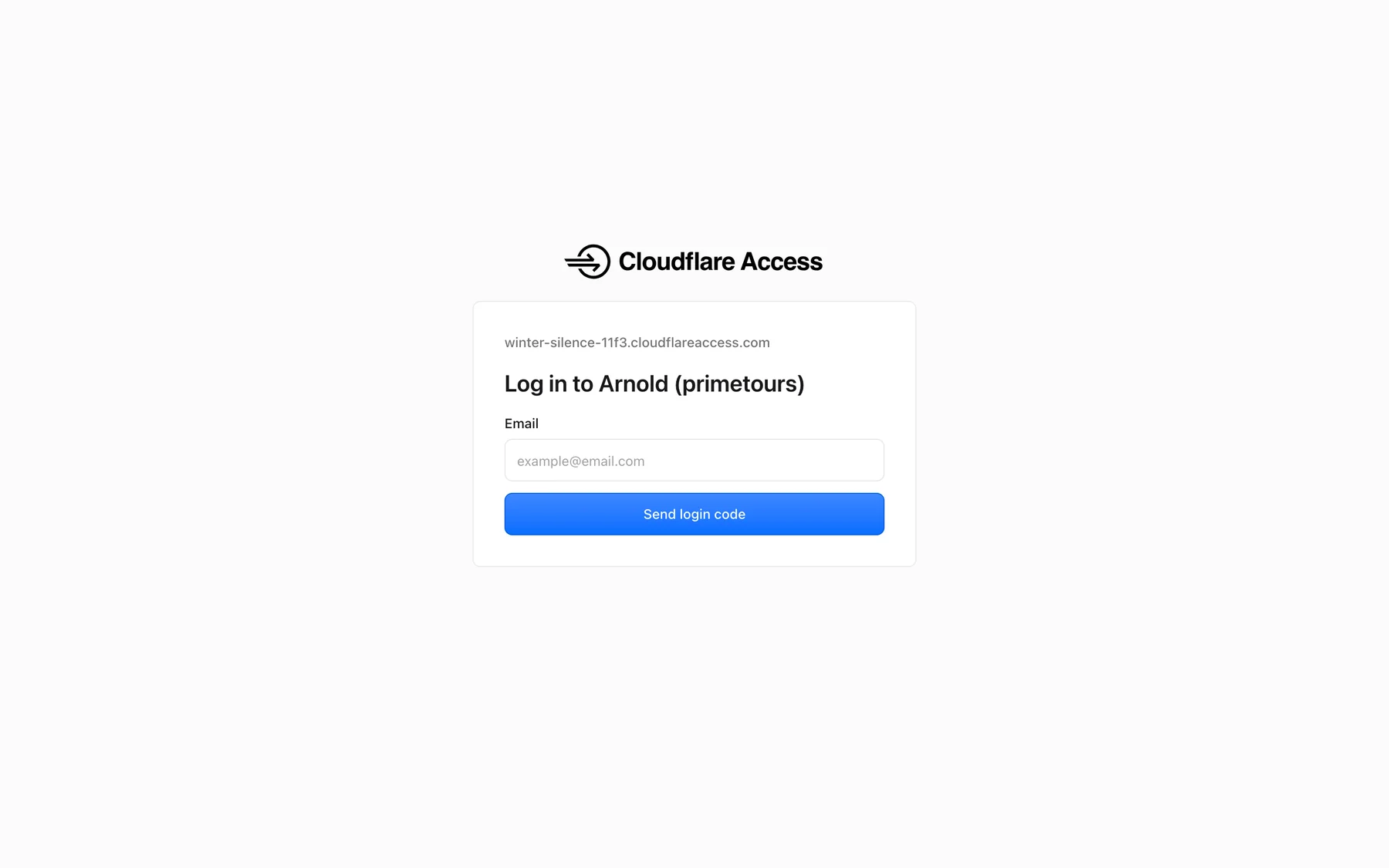
- Open arnold.blumi.at.
Any browser works. On the phone, Safari or Chrome.
- Enter your work e-mail and press Send login code.
Only
@primetours.ataddresses get in. Avellera colleagues use their primetours.at address too. - Type the code from the e-mail.
You stay signed in for 30 days on that device. No password to remember.
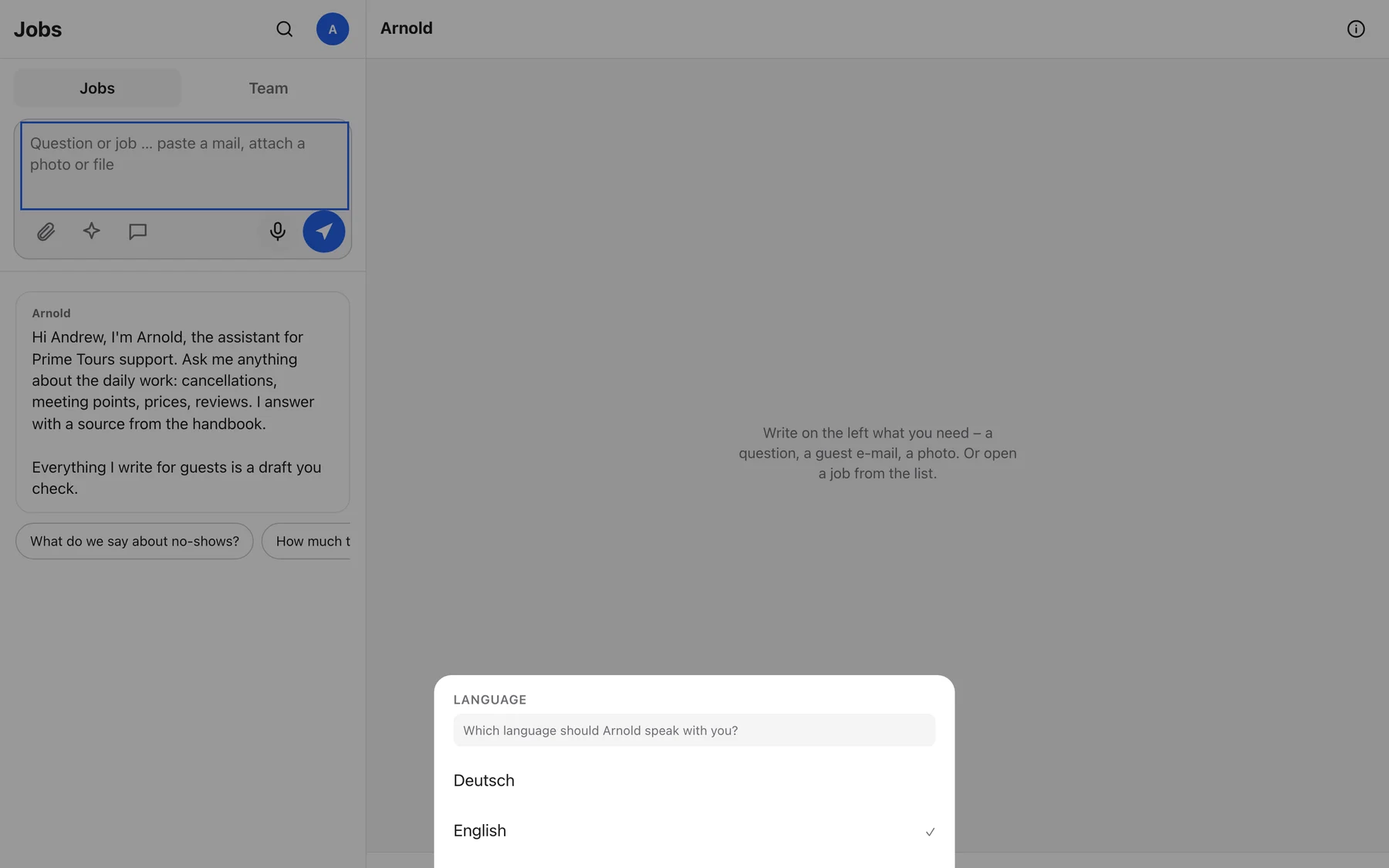
- Pick your language.
On the first visit Arnold asks Which language should Arnold speak with you?: Deutsch or English. This sets the interface on every device you use, and you can change it any time from the avatar menu.
- Check your name in the top-right circle.
Arnold shows the first letter of your name. Tap it and choose Change name if it shows only your e-mail alias.
Install Arnold on your phone
Arnold is a web app that behaves like a native app once it is on your home screen. Notifications only work after this step.
Open arnold.blumi.at in Safari, tap Share, then Add to Home Screen. Arnold shows this tip himself the first time.
Open arnold.blumi.at in Chrome, tap the menu, then Add to Home screen or Install app.
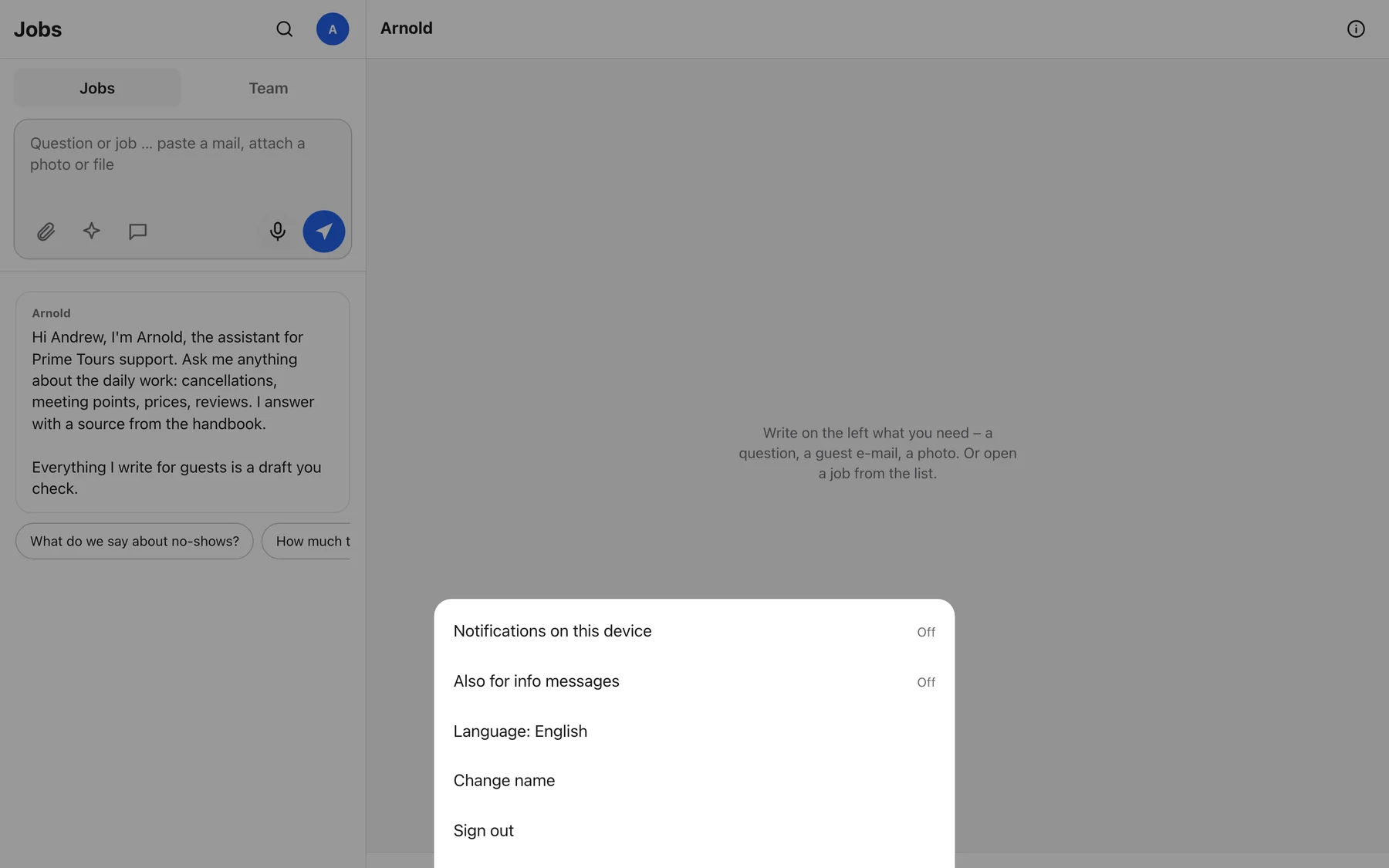
After the third visit Arnold asks Arnold can notify you when he needs you. Choose Turn on. You can change this later under your avatar, Notifications on this device.
Your first question
Type a question into the box at the top left and press Send. Arnold answers in 10 to 60 seconds and shows the source he used as a small grey chip under the answer. Good first questions:
Write German, get German. Write English, get English. Drafts for guests always come in the guest's language, whatever it is. If your message gives no clue ("ok", "thanks", a number), Arnold uses the language you picked in the menu.
Your first week
Arnold runs in shadow mode. He helps, you check. The most useful thing you can do in week one is to use him for real work and correct him every time he is off.
- Before you look something up in the handbook or ask a colleague, ask Arnold first. Note whether he was right.
- Paste the morning booking e-mails from FREETOUR and GuruWalk. Compare his checklist with what you enter in FareHarbor.
- Get two review replies and one guest e-mail drafted per shift. Judge honestly: would you have sent it?
- Correct immediately. Do not collect corrections for later. Each one changes his next answer, for everyone.
- Friday: tell Sergiu or Clemens in three sentences what saved time, what was wrong, and what is missing.
Day one checklist
Ticks are saved on this device only.
Arnold's daily-operations knowledge is Prime Tours: Vienna day tours, channels, no-shows, FareHarbor. For Avellera he knows the brand, the cancellation terms, the lead sources and their rules, the regional knowledge from Clemens' sales skills, and he builds the Avellera trip-offer PDF and the TravelLocal first message. Ask him Avellera questions the same way. If something is not documented he says so and files a gap rather than guessing from Prime Tours rules.
- Arnold does not read the bookings mailbox on his own yet. Paste booking e-mails by hand.
- Arnold reads FareHarbor but never writes into it, nor into Civitatis, GuruWalk or FREETOUR.
- Arnold sees the tour catalogue in EasyPlanning, not the week plan, free slots or guide assignments. EasyPlanning does not expose those yet.
- Trello is being retired. Arnold does not read it and no longer points to it.
- Arnold does not send e-mails to guests, ever. Only internal notes to the team.
- Google sign-in and the address arnold.primetours.at come with the handover. Today it is arnold.blumi.at and an e-mail code.
The screen
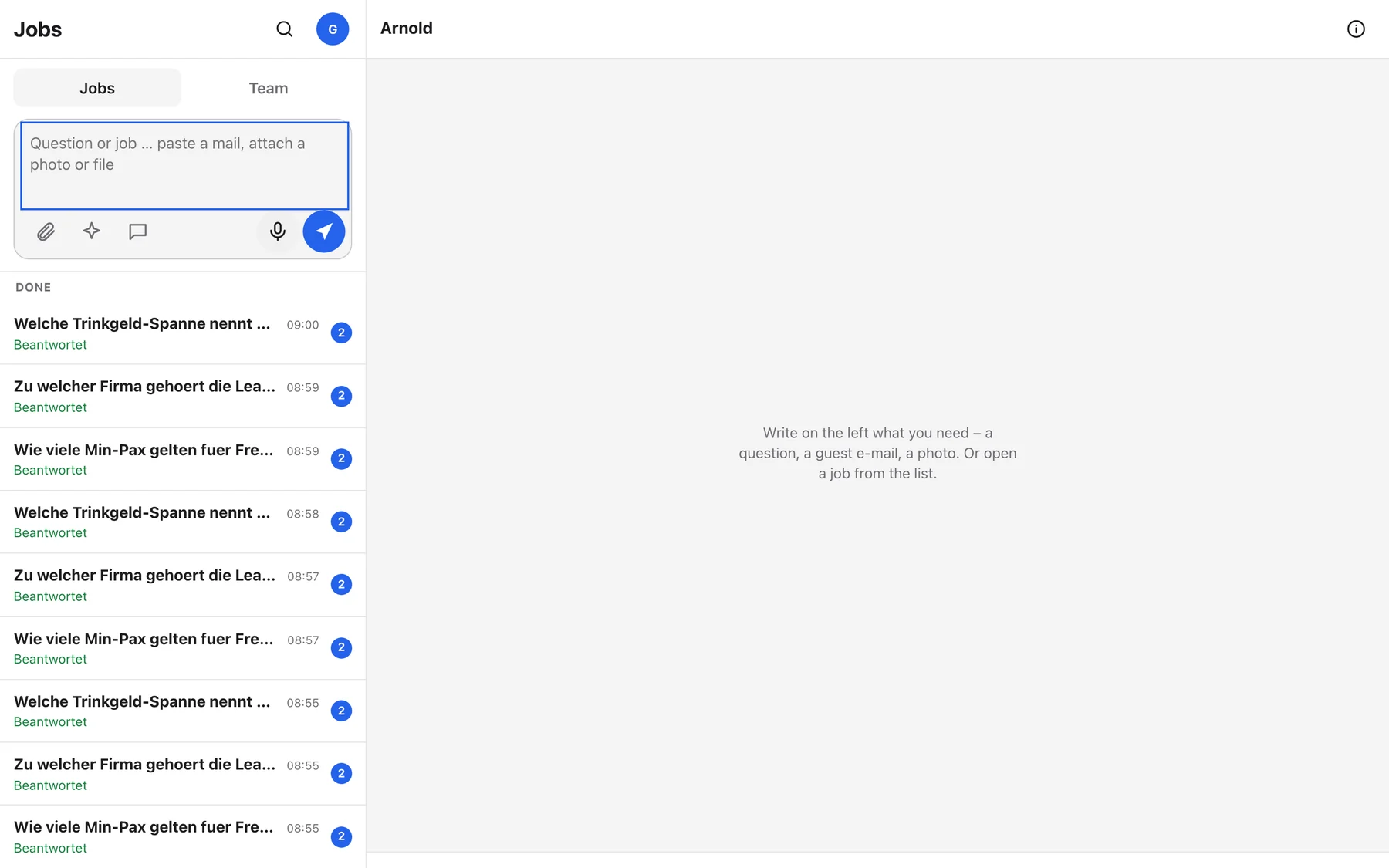
Two panes on a desktop, one at a time on the phone. Left: your jobs and the team. Right: the job you are looking at.
 1
2
3
4
5
6
7
8
1
2
3
4
5
6
7
8
- 1Jobs and Team tabs. Jobs is your list. Team holds the group chats and the shared checklist. Aufträge · Team
- 2Search. Finds words in job titles, messages and group chats you can see. Suchen
- 3Your avatar. Notifications on or off, change your name, sign out. Menü
- 4The ask box. Type, paste an e-mail, or drop a file. Every send here starts a new job. Frage oder Auftrag …
- 5Attach, Creative, TravelLocal first message. Files and photos, the creative studio, and the sales opener for TravelLocal inquiries. Anhängen · Kreativ · TravelLocal-Erstnachricht
- 6Speak and Send. Hold the microphone to dictate. Send with the arrow or with Enter on a desktop, Shift+Enter for a new line. Sprechen (halten) · Senden
- 7The job list. Grouped into For you, In progress, Open, Done, then older jobs. Blue badges count unread messages. Für dich · In Arbeit · Offen · Erledigt
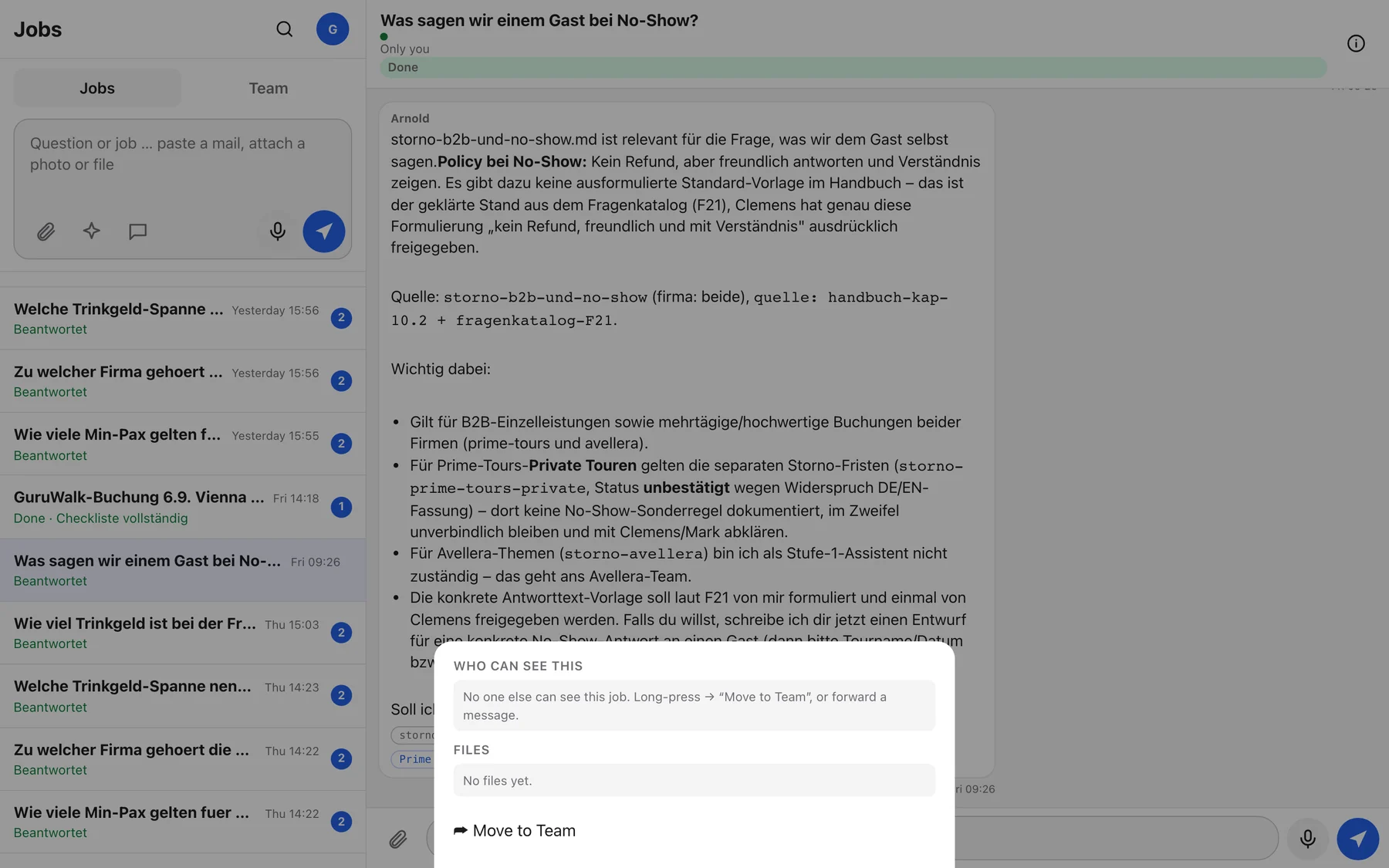
- 8Info. Who can see this job, its files, and Move to Team. Wer sieht das · Dateien · Ins Team verschieben
Jobs, not chats
Arnold sorts everything into jobs. A job is one topic: a guest e-mail, a booking morning, a quote, a question. Each job has a one-line title, a visibility line and a status. The title comes from your first message, or from the subject line when you paste an e-mail, and Arnold sharpens it once he knows what the job is about. Sending from the ask box always opens a new job. Writing in the box at the bottom of an open job, Continue with Arnold …, keeps the topic together. While you type, the list refreshes in the background without touching your text or your scroll position.
What the status words mean
| You see | German | Meaning | What to do |
|---|---|---|---|
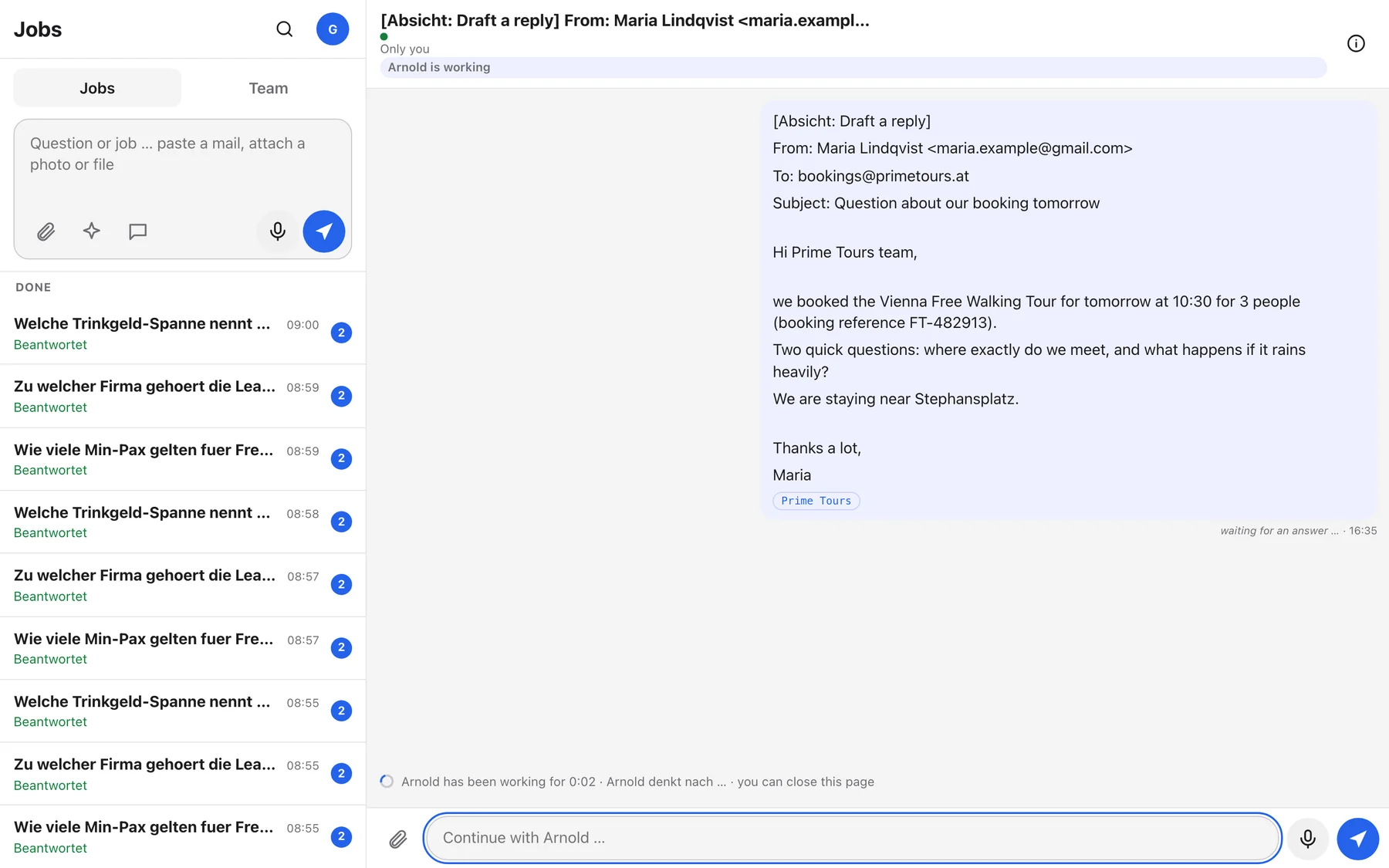
| Arnold is working | Arnold arbeitet | A turn is running. The activity line under the messages names the step. | Nothing. You can close the page, the result waits for you. |
| waiting for you | wartet auf dich | Arnold needs a decision, an answer or a file from you. | Open the job, read his question, reply below. |
| waiting for Robin | wartet auf Robin | Arnold has asked a colleague. Their name is shown. | Wait, or chase them if it is urgent. |
| awaiting decision | wartet auf Entscheidung | Clemens has to approve or reject something. Buttons appear in his list. | Leadership: Approve or Reject with a reason. |
| Open | Offen | Nothing running, nobody waiting. | Continue when you like. |
| Done · Answered | Erledigt · Beantwortet | A question was answered, or work finished. The green words after Done are the result in Arnold's own words, in your language. | Read the result card at the top of the job. |
Inside a job
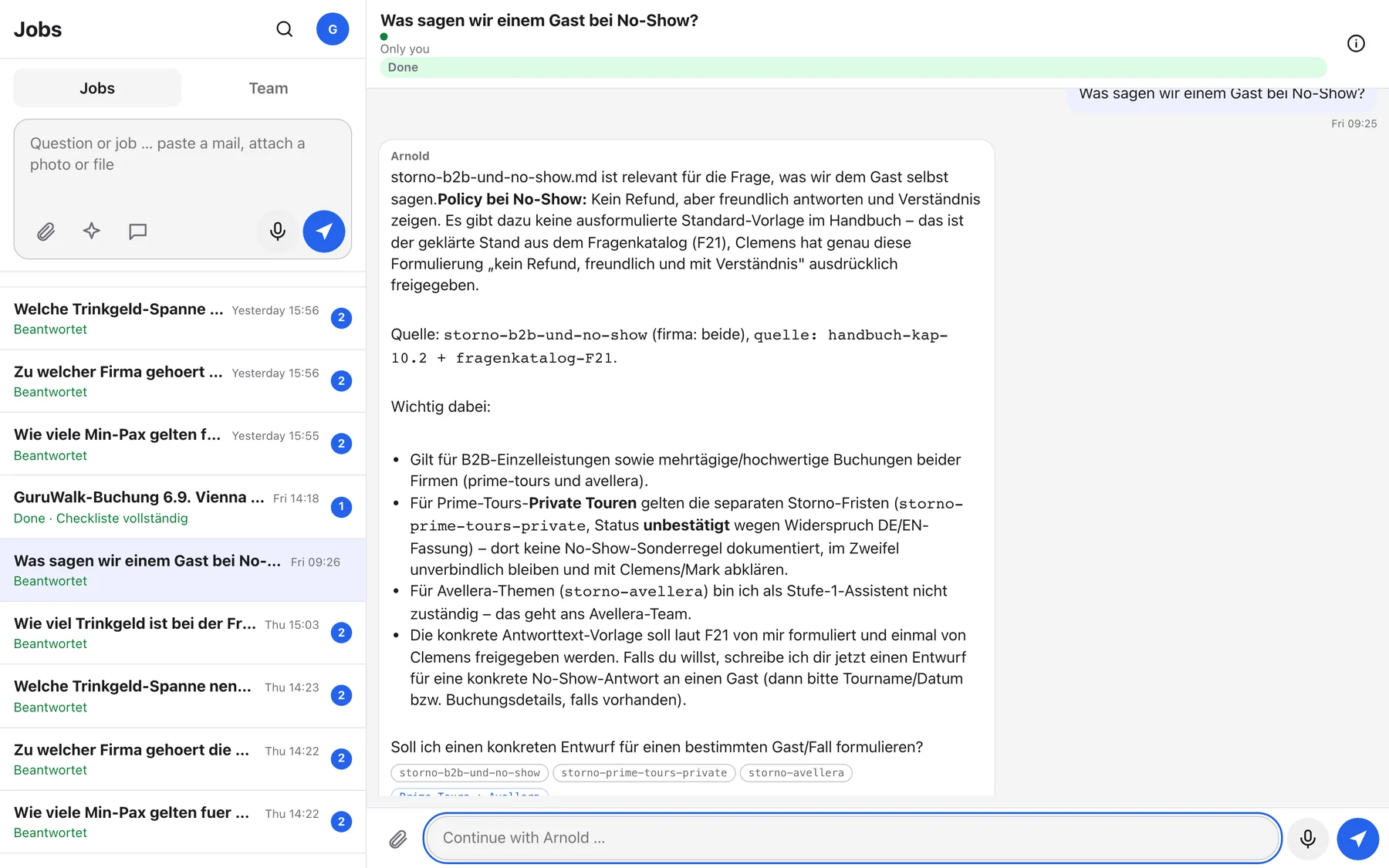
storno-b2b-und-no-show. The blue chip names the brand the answer applies to.- Title bar: the job title, the visibility line (Only you or the group name), the status pill, the Done button and Info.
- Result card: when a job is finished, a card at the top summarises the outcome so you do not have to scroll.
- Source chips: the handbook topics behind an answer. If there is no chip, ask Arnold where the information comes from.
- Suggestion chips: under the last message Arnold sometimes offers next steps as buttons. Tap one to send it.
- Message menu: long-press a message on the phone, right-click it on a desktop, or tap the three dots.
On the phone
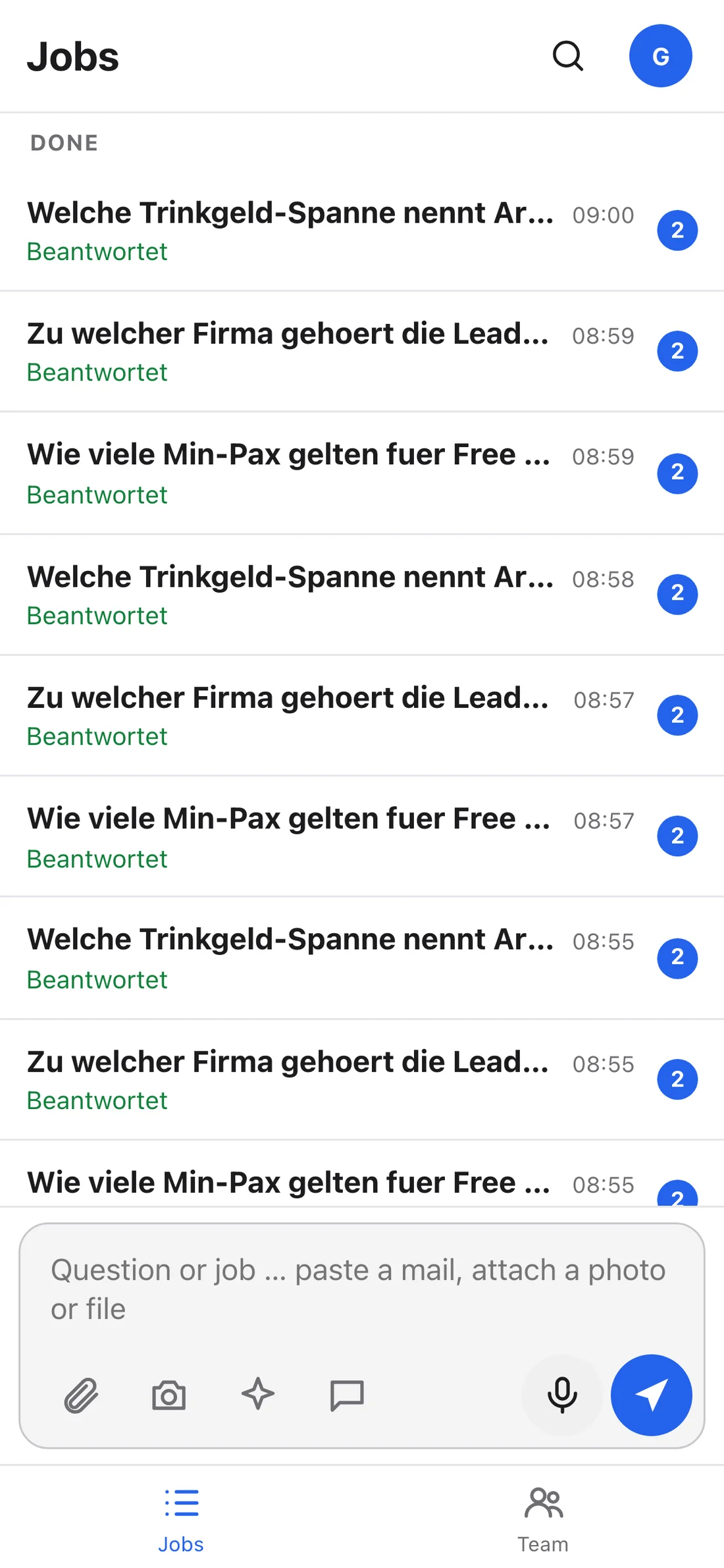
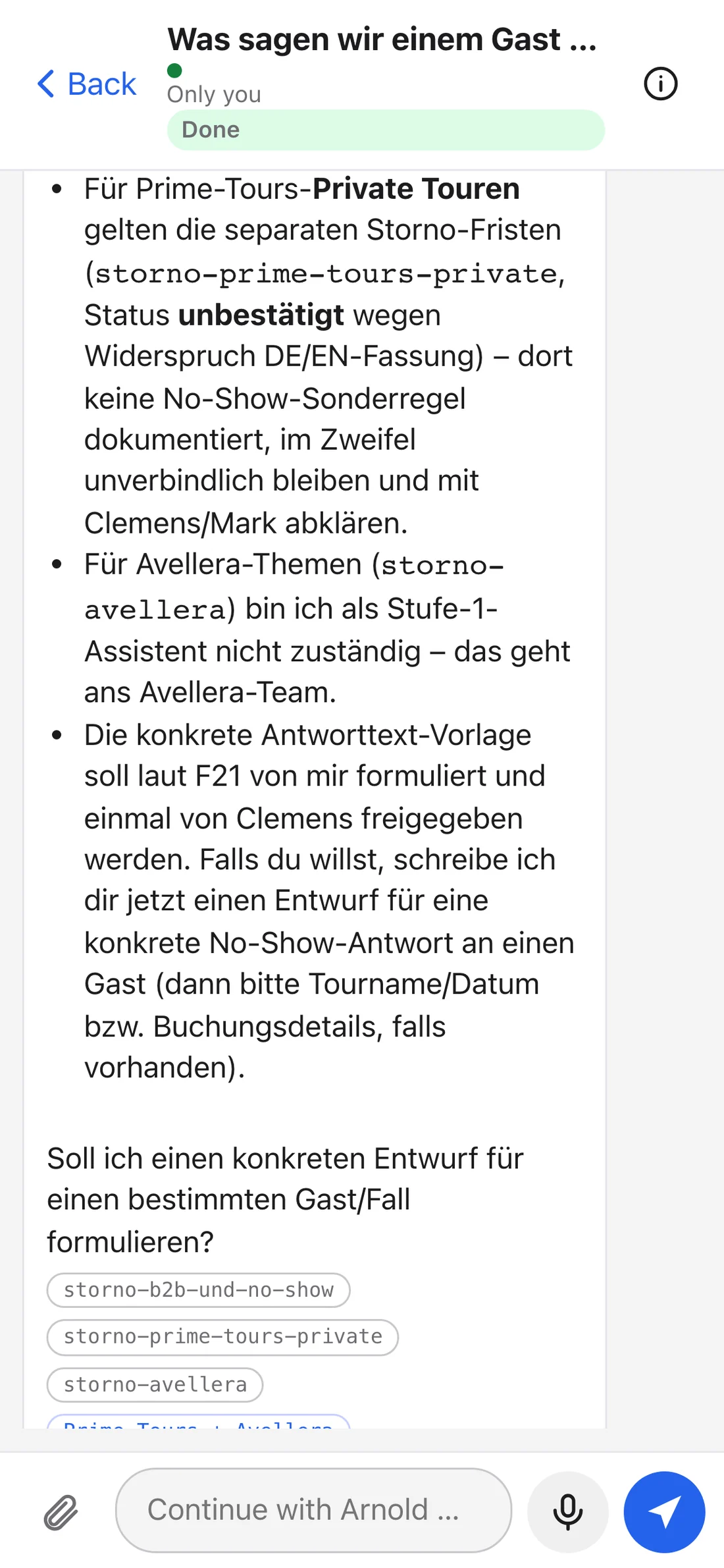
Search
Your avatar menu
What Arnold can do
You never pick a tool. Write what you need, in plain words, and Arnold decides whether it is a question, a draft, a checklist or a build. This is the full catalogue of what he does today, grouped by the moment it comes up.
Tags: answers a reply in the chat · draft a text you copy and send yourself · produces a checklist, file or message.
Daily support work
Handbook questions
Anything in the team handbook and the 71 knowledge topics: no-show rules per channel, cancellation terms per brand, tipping policy, minimum guests, meeting points, who to escalate to, how FareHarbor and EasyPlanning are used, the B2B price list.
Transfer bookings and cancellations
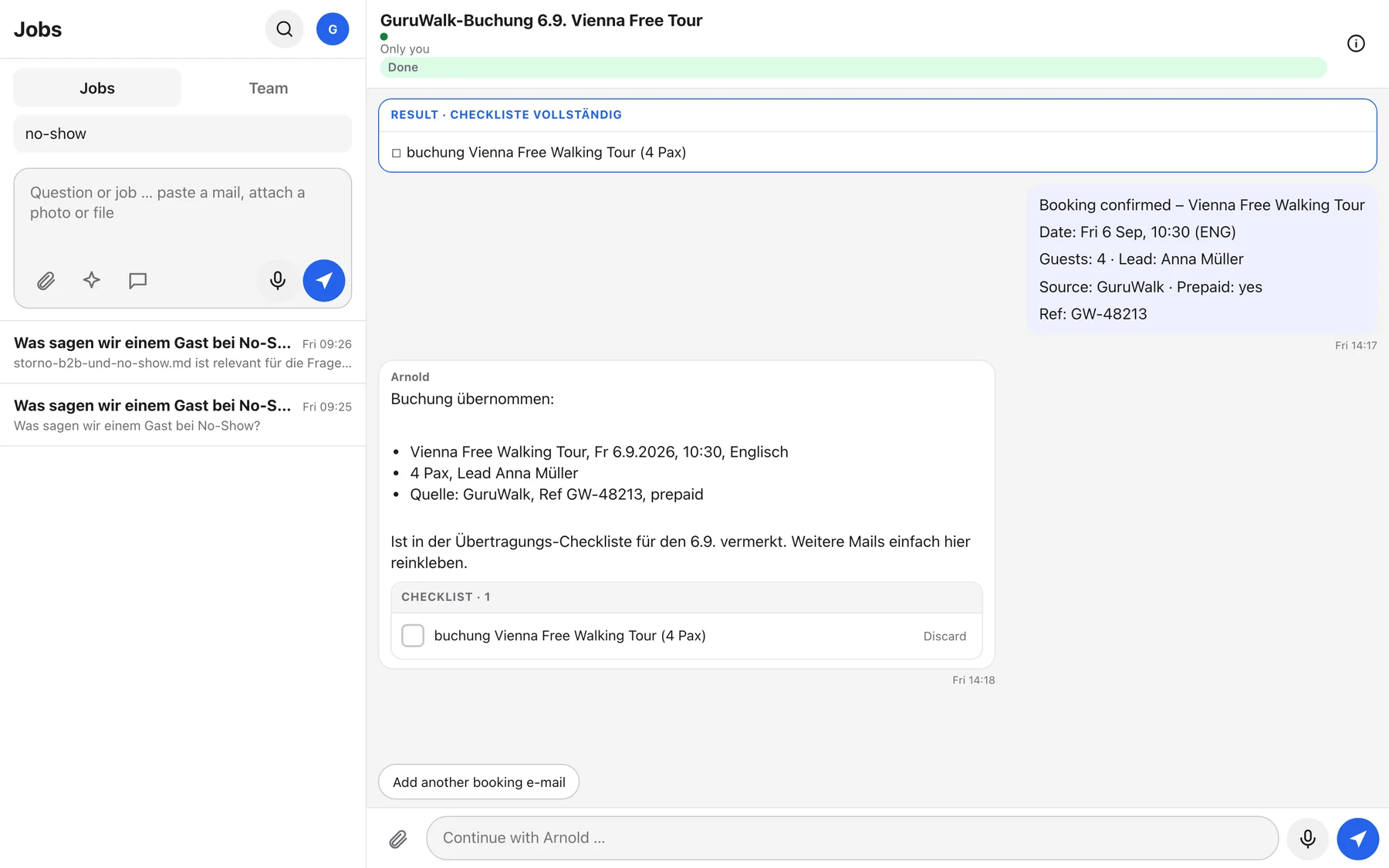
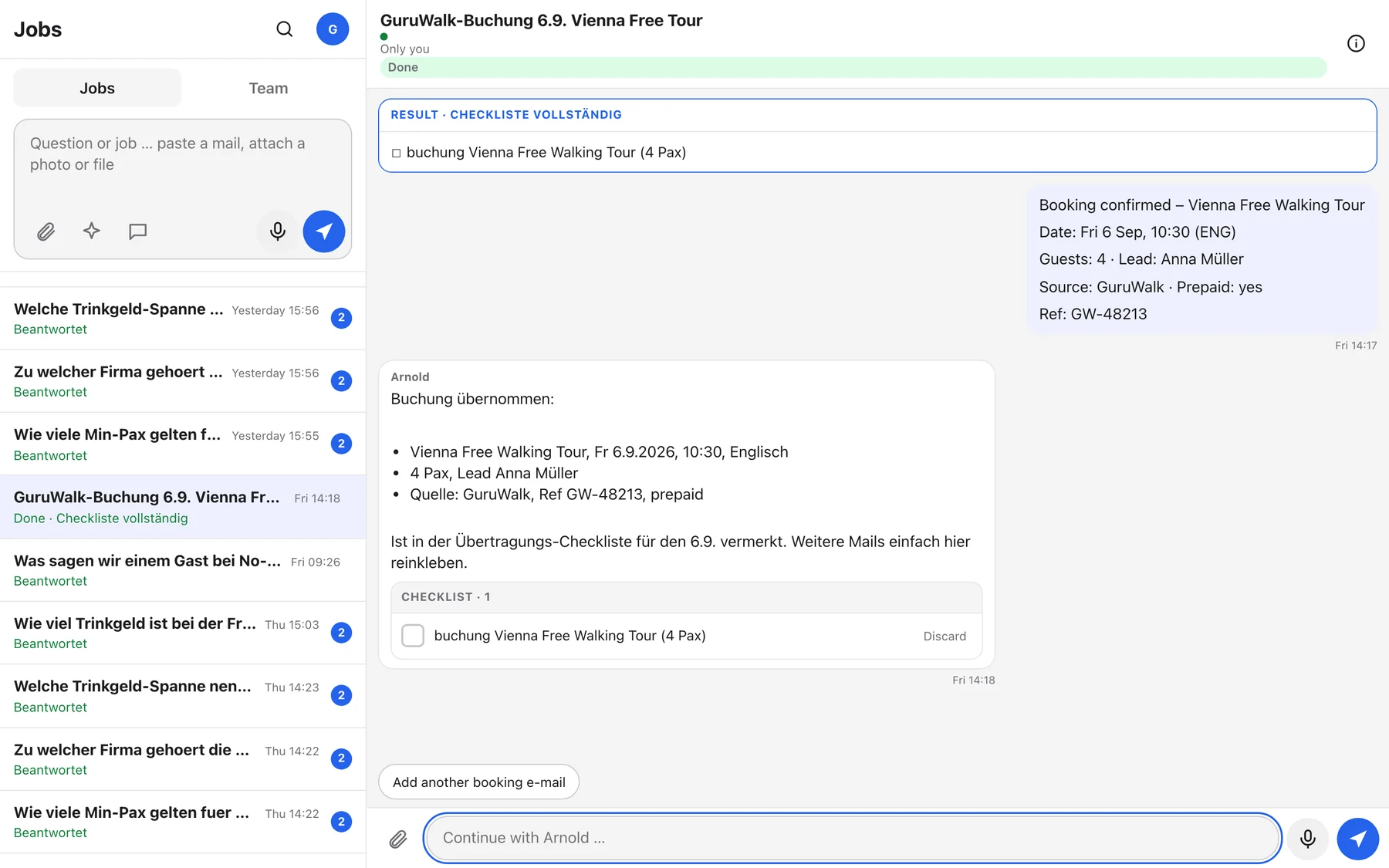
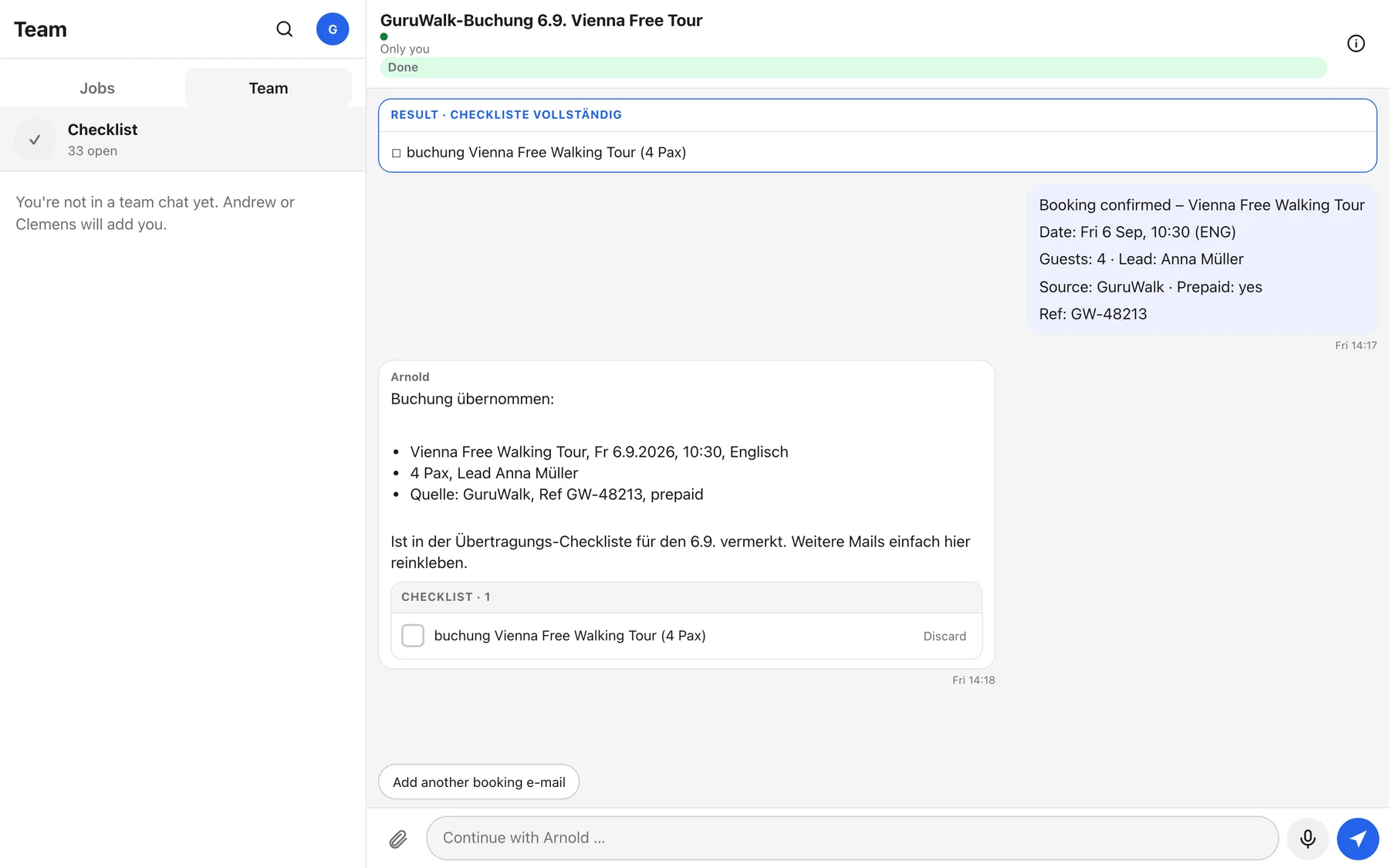
Paste the FREETOUR and GuruWalk e-mails of the morning. Arnold extracts tour, date, time, language, lead name, guests, reference and prepaid status, adds hints such as "reference missing" or "second guide needed", and puts the entries on the day's transfer checklist that the whole team sees in the Team tab.
Guests and reviews
Reply to a guest e-mail
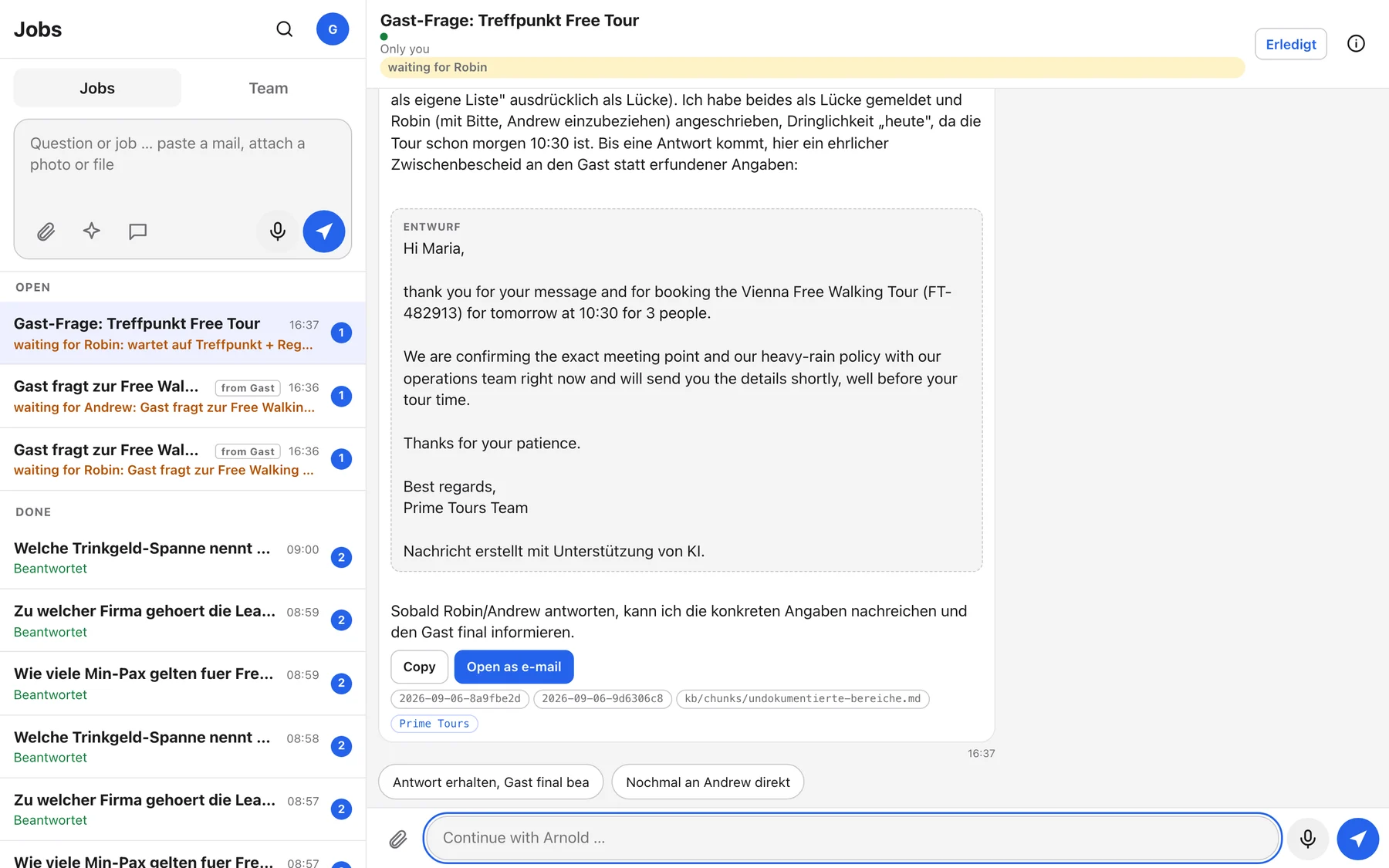
Paste the guest's e-mail. Arnold recognises the language, answers from the handbook, and writes the reply as a draft in the guest's language with the mandatory AI footer at the end. If he lacks a fact, he says so in the job and asks a colleague rather than inventing it.
Answer a Google review
Paste the review text. Arnold drafts a reply in the review's language following the handbook's review rules: thank, address the specific point, no arguing, no promises.
Read a document, a photo or an e-mail file
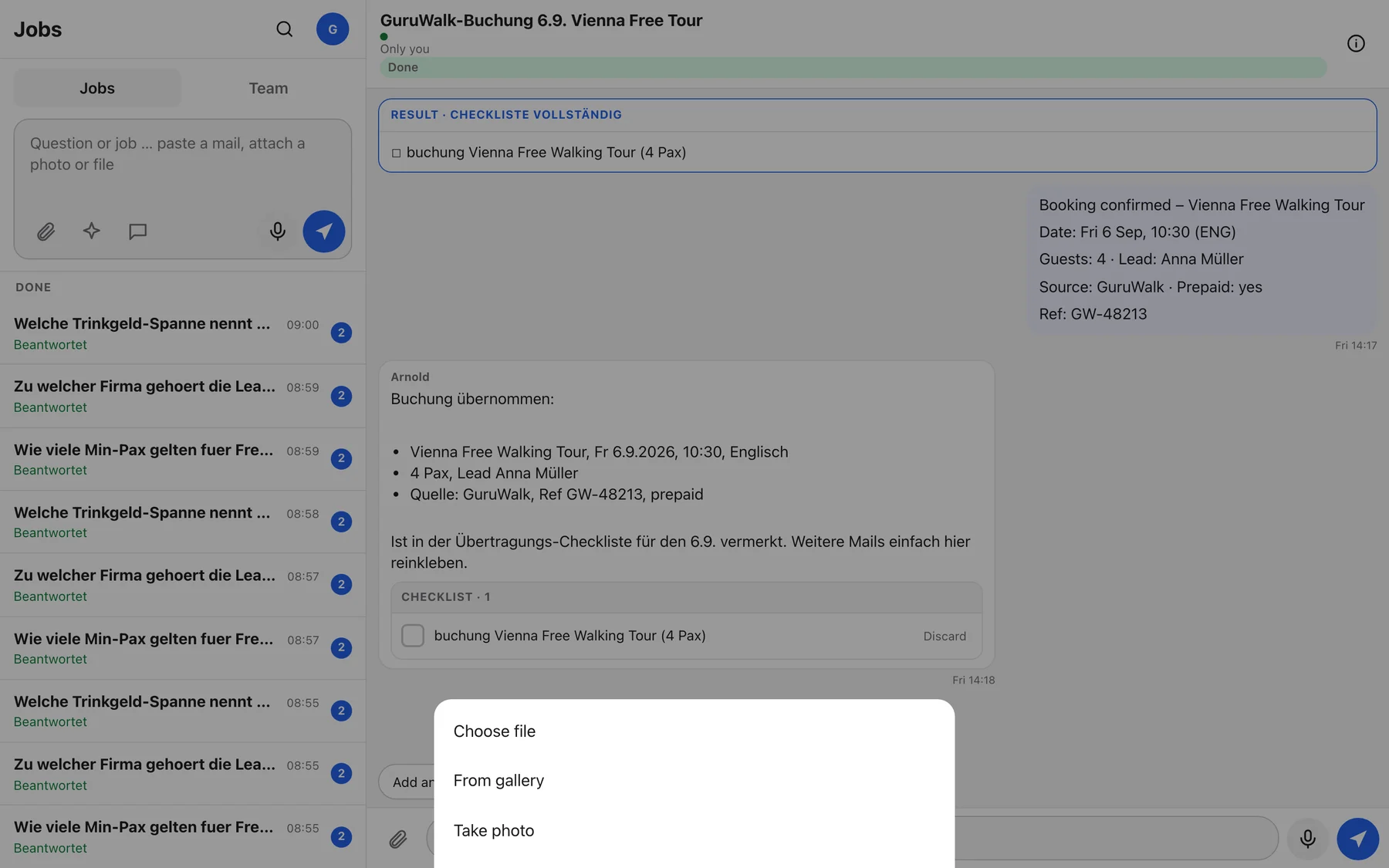
Attach a PDF, Word or Excel file, a CSV, a text file, an .eml e-mail or a photo, up to 25 MB each and eight per message. Arnold reads the text and can answer questions about it, summarise it or use it for a draft. Photos are downscaled and stripped of location data before they are stored.
Prices, quotes and invoices
Calculate a B2B quote
Name the service, number of guests, date and any extras. Arnold calculates from the B2B price list, lists every line at list price, adds region surcharges and the 3 percent card fee as separate lines, and drafts the quote. Before he names a price for a new request he checks the five pre-pricing fields: guests, date, experience profile, budget, travel occasion. He asks for what is missing, at most two questions.
Check someone else's numbers
Paste a quote, an invoice or a price statement from a colleague or partner. Arnold hands it to the Prüfer, who recalculates every line against the price tables and reports what does not add up.
Sales
TravelLocal first message
The button with the speech bubble. Paste a TravelLocal inquiry and Arnold writes the first answer in Clemens' voice, with the Calendly link and the three qualification questions, following Clemens' own sales skill. A visible note line tells you what he assumed.
Avellera trip offer PDF
Via Creative. Arnold builds the Avellera trip-offer document in Clemens' design, with the pre-pricing gate applied. The result is filed on Drive and posted into the job as a file card.
Creative studio
Presentation, landing page or graphic
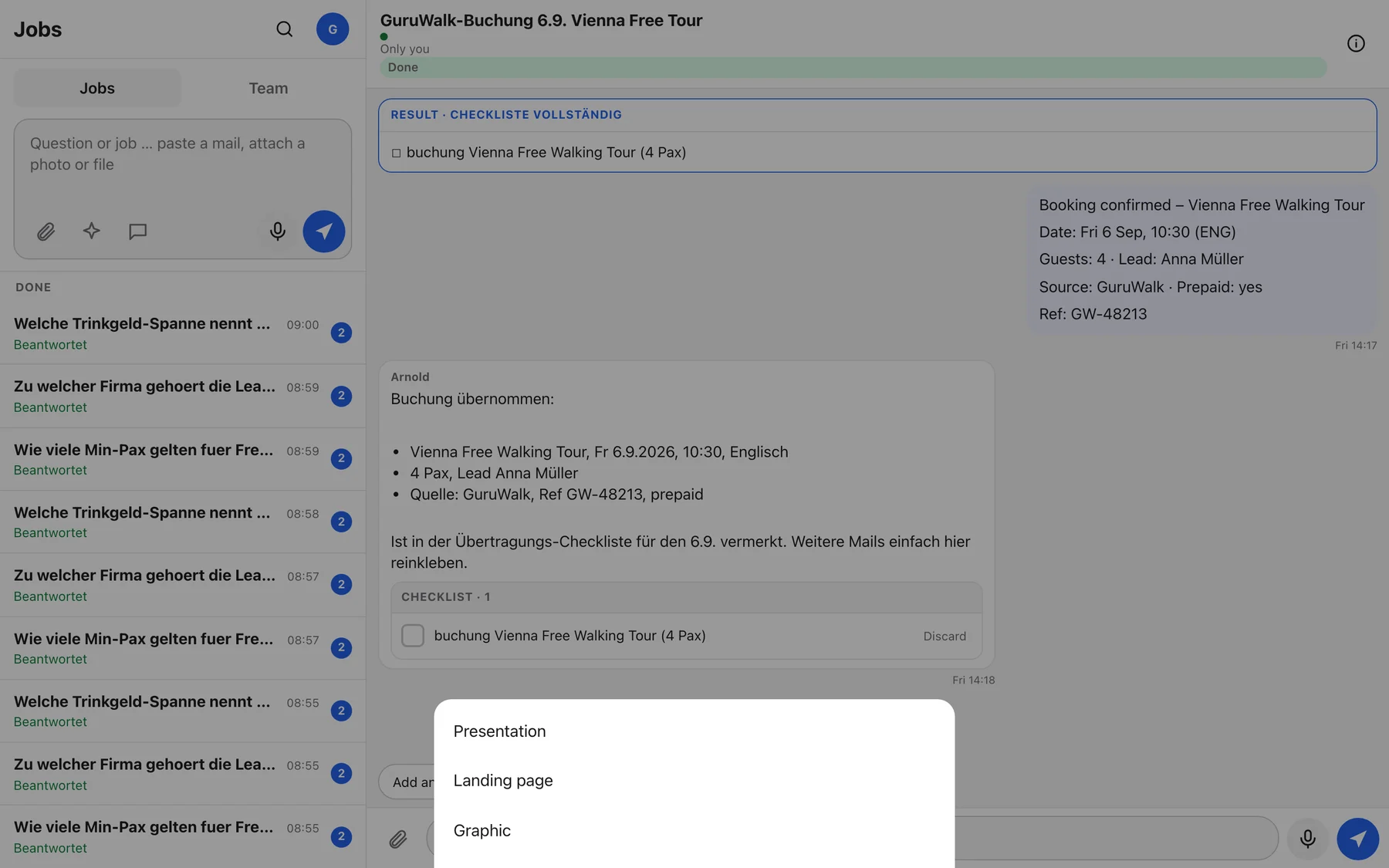
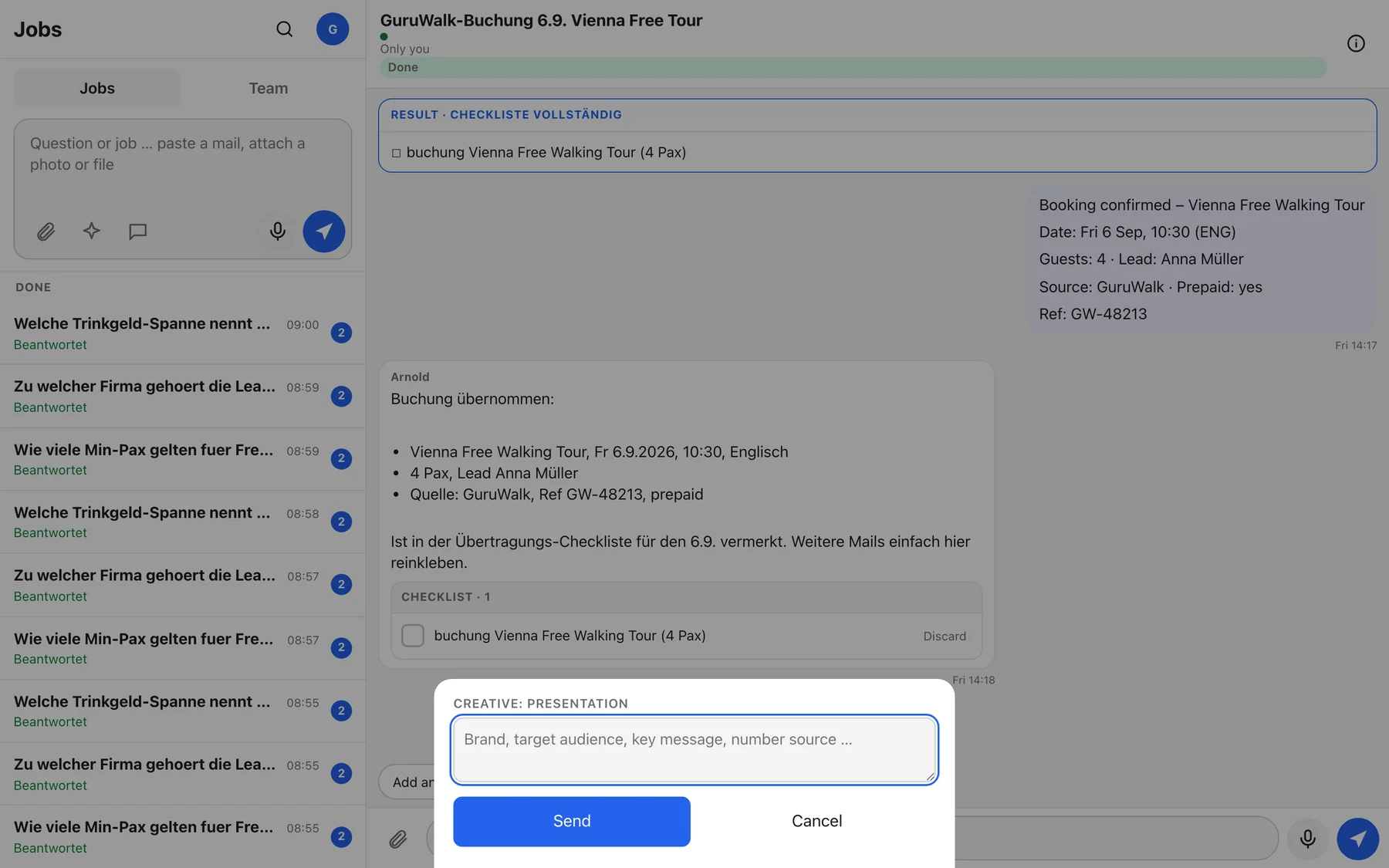
Tap Creative, pick Presentation, Landing page or Graphic, and describe brand, audience, key message and where the numbers come from. A separate creative agent builds it with the Prime Tours or Avellera brand book, real photos from the brand pool, and runs a style check, a numbers check and a design check before it files the result.
Looking into FareHarbor
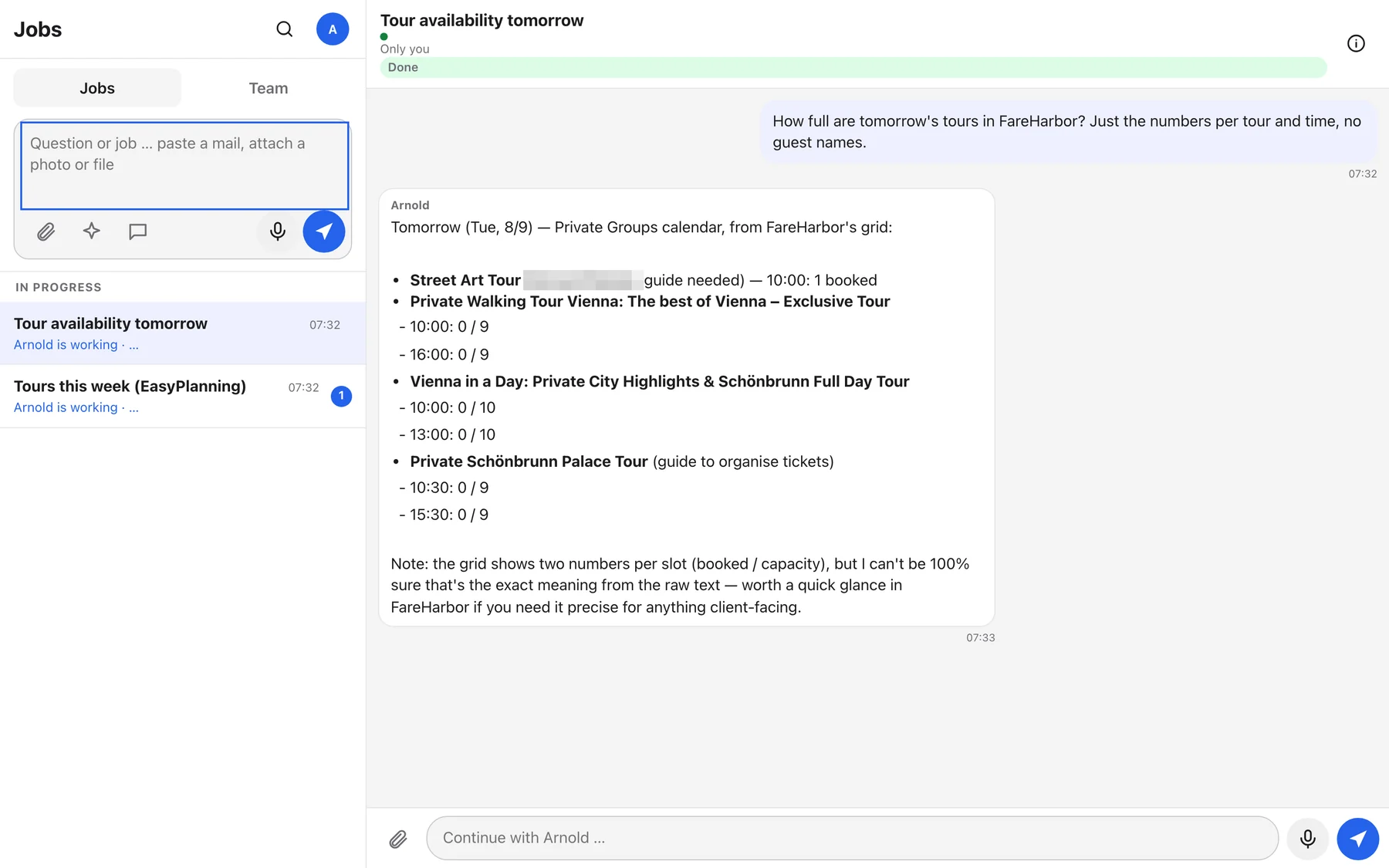
Availability, manifest, one booking
Arnold reads FareHarbor through his own signed-in browser on his machine, exactly as a person would look at the dashboard, and only reads. Three things he can look up: the booking grid of a day (which departures, how full), the manifest of a day (guests per departure, group size, source, status), and a single booking by its reservation code. Guest data passes the same privacy gateway as e-mails.
Tours and guides planning
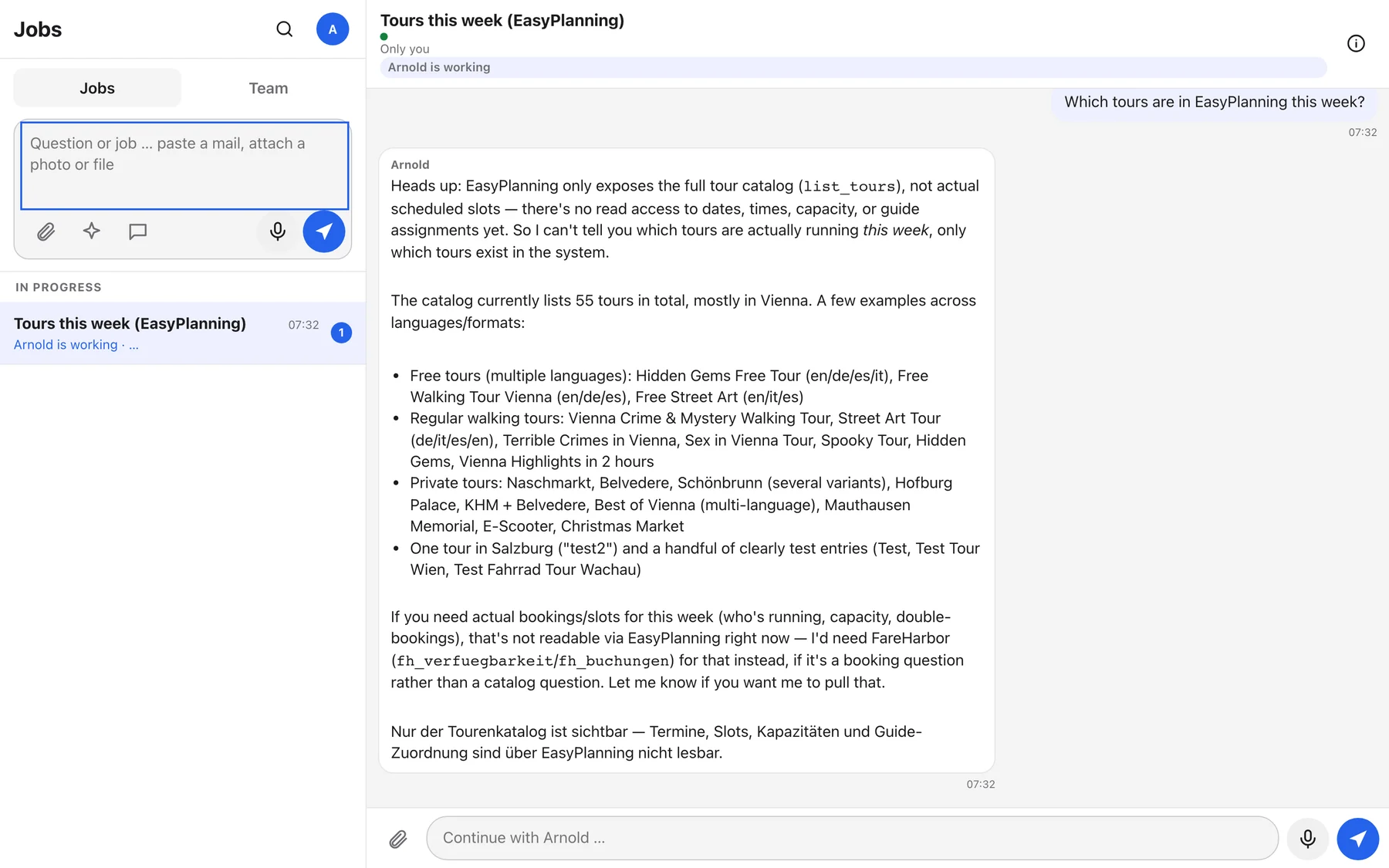
Tour catalogue from EasyPlanning
Arnold reads the live tour catalogue from EasyPlanning: which tours exist, city, duration, languages, how many guides a departure needs. That is the catalogue, not the week plan. EasyPlanning does not yet let him read scheduled departures, free slots, capacities or which guide is assigned, and every answer starts with that sentence so nobody mistakes the list for a schedule.
Reaching people and approvals
Ask a colleague inside Arnold
When Arnold needs a fact only a person has, he creates a small job in that person's list, for example "Guest asks about the meeting point tomorrow 10:30", and sets your job to waiting for that person. For urgent matters they also get an e-mail. You can ask for this too: "Ask Robin whether we have a guide for Saturday."
Request an approval from Clemens
Prices below the guardrail, B2B above budget, publishing a landing page: Arnold sends an approval card to Clemens' list and to the Leitung chat. Your job shows awaiting decision until he answers.
Report a knowledge gap
When the handbook has no answer, Arnold files a gap instead of inventing one. You can file one yourself from the message menu: This is missing from the handbook. Gaps are collected for the weekly round.
Voice
Dictate instead of typing
Hold the microphone button, speak, release. The recording is transcribed on Arnold's own machine, never sent to a cloud, and neither audio nor text is kept. Check names before you send, transcription can mishear them. Up to two minutes per recording.
How to ask
Arnold is good at plain language. He is bad at guessing what you left out. Four ingredients make almost every request work first time.
A fact, a draft, a checklist, a quote, a file. Say it: "Draft a reply", "Just tell me", "Put this on the checklist".
Paste the e-mail, the review, the inquiry. Attach the PDF. Arnold cannot see your inbox or FareHarbor.
Guests, date, language, brand, budget, what you already told the guest. Every fact you give is one he does not have to ask for.
"Short", "formal", "no discount", "in German". Otherwise he uses the handbook default.
What Arnold cannot see
Arnold has no eyes on your inbox, EasyPlanning slots and guide assignments, Notion, WhatsApp or the phone. Trello is being retired and he does not read it. He knows the handbook, what you paste or attach, the shared checklist, the corrections, the EasyPlanning tour catalogue, and he can look things up in FareHarbor when you name a date or a reservation code. If the answer depends on an e-mail or a conversation, paste it. "The guest from this morning" means nothing to him, "the 10:30 Free Tour on Saturday" does.
Pasting an e-mail
One topic, one job
- New topic: use the ask box at the top. Arnold opens a new job and names it.
- Same topic: open the job and write in Continue with Arnold … at the bottom. He keeps the whole context.
- Several bookings in one morning: one job. Paste the next e-mail with Add another booking e-mail.
- Reply to a specific message: message menu, Reply. Arnold sees which message you mean.
Vague versus useful
| Vague | Useful | Why |
|---|---|---|
| Storno? | What are the cancellation terms for a Prime Tours private tour booked for 20 people, cancelled 5 days before? | Brand, product and timing decide the answer. |
| Answer this | Draft a reply, friendly, English, we cannot refund but offer to rebook. [paste e-mail] | The decision is yours, the wording is his. |
| Price for a tour | Quote for 12 people, 2-hour Vienna Free Tour as a private booking, 3 October, in German. Budget around 400 euro. | Guests, date, product and budget are the five fields he needs anyway. |
| Make a presentation | Creative, Presentation: Prime Tours, 6 slides for a school in Linz, day trip offer, numbers from the tour list, warm tone. | Brand, audience, message and number source are what the creative agent asks for. |
Languages
Three languages that have nothing to do with each other:
- Talking to you: Arnold answers in the language of your message, German or English, and switches with you mid-job. Job titles and status words follow the same language. For messages without a clue ("ok", "danke", a forwarded text) he uses your menu language.
- Drafts for guests: always the guest's language, never yours. He writes German, English, Spanish, Italian and French directly. For any other language, say Hungarian or Japanese, he drafts in English, tells you why above the draft, and restates the guest's questions in English instead of quoting them. You decide whether to send it or bring in a colleague who speaks the language.
- The interface: your choice from the first visit, changeable under your avatar, Language: English or Sprache: Deutsch. It applies on every device you sign in with.
Facts stay facts in every language: cancellation terms, meeting points and prices are translated, never reinterpreted. Ask for a specific language explicitly if you need one.
While Arnold works
Example tasks
Copy any of these into the ask box and replace the brackets. They are grouped by the moment in your day.
Shift start
Guest e-mails
Reviews
Quotes and prices
Sales
Creative
Files and planning
FareHarbor
Give feedback
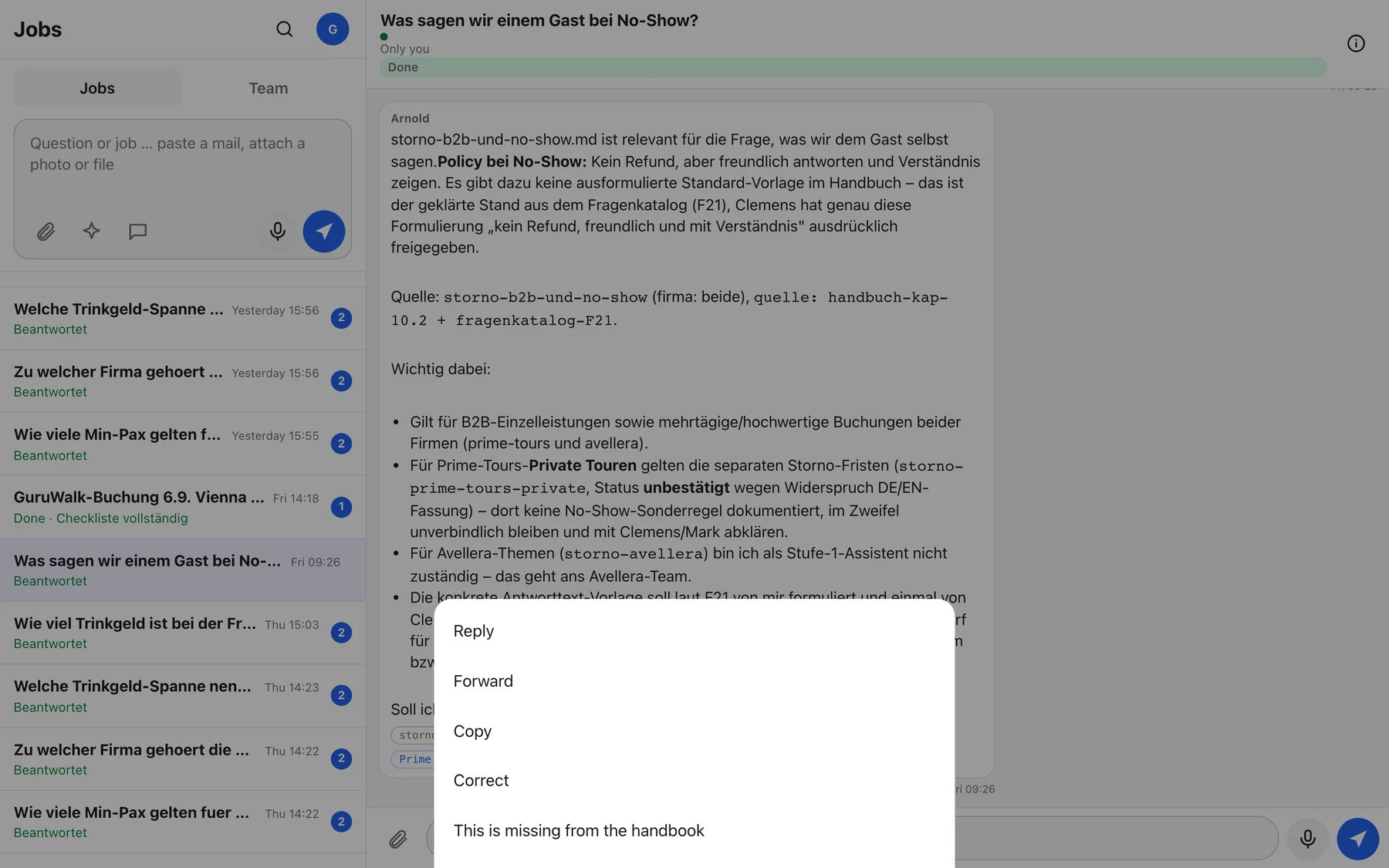
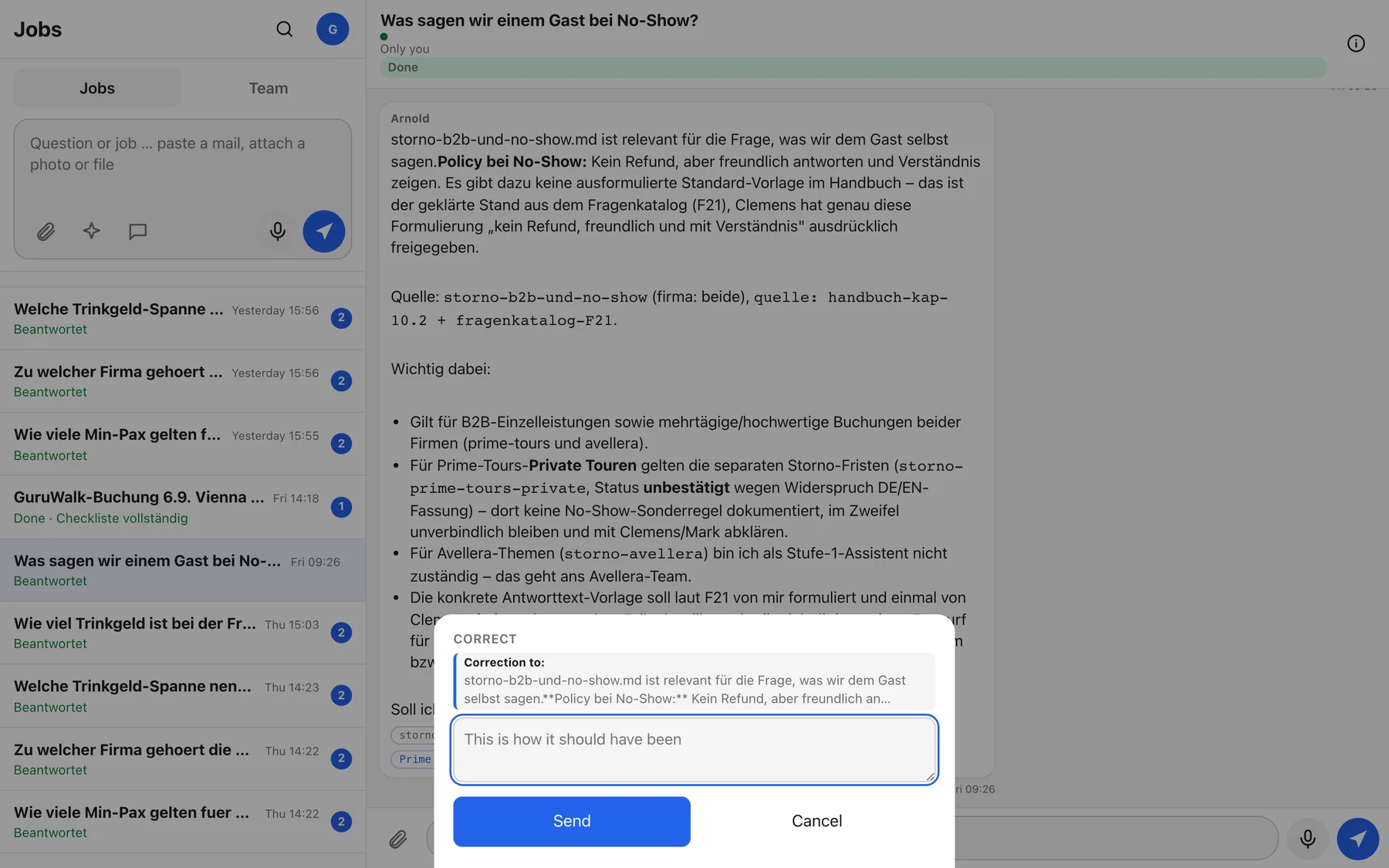
Correcting Arnold is the most valuable thing you do with him. A correction changes his next answer immediately, for everyone, and gets built into the knowledge base within a week.
Correct
- Open the message menu on Arnold's answer.
Long-press on the phone, right-click on a desktop, or the three dots.
- Choose Correct.
A sheet opens headed Correction to: with the message quoted.
- Write what would have been right.
One or two sentences. The fact, not the feeling. "Meeting point for the Spanish Free Tour is the Albertina, not Stephansplatz."
- Send.
Arnold confirms with Thanks, noted. From now on he sees this correction before every answer, no matter who asks.
A correction is a fact for the record. If you are not sure who is right, ask Arnold for the source first, then correct if the source is wrong. If two sources disagree, tell Andrew, he owns the knowledge base.
This is missing from the handbook
Same menu, second option. Use it when Arnold could not answer because the handbook has no entry, or when you know something the handbook should say. Write the topic and what is missing. Arnold files it as a gap. The same topic reported twice in a week is counted, not duplicated.
Discard a checklist entry
If Arnold put something wrong on the transfer checklist, tap Discard on that row and give a short reason. The reason goes into the weekly round so the extraction improves.
What happens next
- Immediately: every correction is shown to Arnold before he answers the next question, for the whole team.
- Sunday 20:00: Arnold turns each new correction into a proposed change to the knowledge base. Andrew, Robin and Michael get one e-mail, "[Arnold] Wochenrunde", with the proposals, the open gaps and a short retro of the week.
- Within the week: a person reviews and applies each proposal. Nothing changes in the knowledge base without a human. Applied corrections become permanent, rejected ones are answered with a reason.
See what Arnold did
Arnold does not work in the dark. Everything he does shows up in one of five places.
The status pill, the activity line while he works ("Arnold is searching the knowledge base …", "Arnold is adding to the checklist …"), the result card when he is done, and the source chips under every answer.
Unread badges, the For you section for jobs that wait on you, and delegation jobs he created for you when a colleague's job needed your answer.
A push notification "Arnold needs you: …" when a job waits for you. Info messages only if you turned Also for info messages on.
The shared checklist with its open count, the Support and Leitung group chats, approval cards, and the daily digest card every morning.
Every mail from Arnold starts with "[Arnold]" in the subject and ends with "Automatische Nachricht von Arnold Neumann". He only e-mails the team, never guests.
Sunday evening: the weekly round e-mail to Andrew and Robin with corrections, gaps and a retro. Monday morning: a security check runs on his machine, new findings ride along in the next weekly mail.
The 07:45 digest
Every morning at 07:45 Arnold sends Andrew and Robin one e-mail and posts the same into the Support chat: open checklist entries from today and yesterday, the number of new corrections, and any notices from the last 24 hours. If there is nothing to report, there is no digest.
Approvals
When Arnold needs a decision from leadership, the job shows awaiting decision. Clemens sees the request in his list and in the Leitung chat with Approve and Reject. A rejection needs a reason, which flows back into the job. The requester sees the outcome as the job's new status.
Marking a job done
Arnold marks his own questions as done. For jobs you drive, press Done in the title bar when you have sent the e-mail or entered the booking. Long-press a row in the list for Done, Move to Team and Archive. Archived jobs disappear from the list and stay searchable.
Where things are
One rule per thing. If you remember only one: files Arnold makes live on the Content shared drive under Arnold, and the link in the chat takes you there.
| Thing | Where | How to get it |
|---|---|---|
| Drafts | In the job, in the grey Entwurf box | Copy puts the text with the AI footer on your clipboard. Open as e-mail opens your mail app with the draft. |
| Files you uploaded | In the job, and under Info, Files | Tap the file card to download. Only people who can see the job can download it. |
| Files Arnold made | Google Drive, shared drive Content, folder Arnold, then brand, year, and one folder per work: Arnold/primetours/2026/2026-09-06_hotel-concierge-deck/ | The file card in the job carries the Drive link and a download. PDF for sending, PPTX for editing, HTML source for landing pages. |
| File names | primetours_2026-09-06_hotel-concierge-deck_v1.pdf | Brand, date, title, version. Never "final". A file that did not pass the checks ends in _entwurf and carries a banner. |
| Transfer checklist | Team tab, pinned row Checklist with the open count | Also in every booking job as a card. Shared by the whole team, whoever filled it. |
| Knowledge base | 71 topics on Arnold's machine, owned by Andrew | You do not edit it directly. Ask Arnold, correct him, or report a gap. Changes go through the Sunday round. Source chips name the topic. |
| Brand books | arnold.blumi.at/brand/prime-tours and /brand/avellera | Colours, fonts, logo rules, tone. Same login as Arnold. |
| Corrections and gaps | Stored on Arnold's machine, summarised every Sunday | Ask Arnold "Which corrections do you know?" for the last twenty. |
| Your old jobs | Under Older jobs at the end of the list, or via search | Search finds any word in titles and messages. Group chats older than 90 days are cleaned out. |
| Backups | Google Drive of arnold@primetours.at, folder Arnold Backups | Nightly at 03:10, the last 14 kept. Nobody needs to touch this. |
What the knowledge base covers
Company and brands
LoeX Local Experience GmbH, Prime Tours versus Avellera, team roles and who belongs to which brand, escalation contacts, emergency line.
Tours
Free Tours, hidden gems and themed walks, food and drink tastings, bike and boat, private tours and team building, day trips, concerts and tickets, what is currently offline.
Channels
FREETOUR, GuruWalk, Civitatis, GetYourGuide, Viator, TripAdvisor, Project Expedition, Meine Insel, and how each one reports no-shows.
Daily operations
Shift start and daily update, manifest colours, no-shows from the previous day, guest communication in the morning, transferring bookings, FareHarbor and EasyPlanning.
Money
B2B price list in five parts, calculation rules and the 30 percent guardrail, region modifiers, payments and invoice labels, guide billing, tipping policy, cancellation terms per brand.
Sales
Clemens' sales voice and Arnold's default voice, price and channel rules, the five pre-pricing fields, priorities, the TravelLocal first message, Avellera regional knowledge.
Rules and safety
Arnold is built to be careful. These are the limits he keeps on his own, and the ones you keep for him.
What Arnold never does
- Send anything to a guest. No e-mails, no review replies, no messages. Every customer text is a draft you send.
- Write into FareHarbor, Civitatis, GuruWalk or FREETOUR. The checklist is a to-do list for a person.
- Promise cancellation fees or payment deadlines. He may quote the terms and conditions, never commit. Those go to Clemens or Mark.
- Name a guide or a guide's availability to the outside.
- Price below the 30 percent margin guardrail (purchase price divided by 0.7, times 1.2) without an explicit note for Clemens.
- Invent a fact. If it is not documented, he says "that is not documented" and names the responsible person.
- Escalate to one person only. Everyday escalations go to Andrew and Robin together.
The AI footer
Every draft for a guest ends with a line in the guest's language, for example "Message co-created with AI" or "Nachricht erstellt mit Unterstützung von KI". It is part of the draft and stays in. Internal checklists and overviews carry no footer.
The two gates before you can copy a draft
Every guest text is checked against the house rules: a greeting, the AI footer, no dashes, no emojis, at most one exclamation mark, no AI filler phrases, no "guaranteed refund" promises, short sentences. If it fails, Arnold rewrites once.
Every quote, invoice and any answer with two or more euro amounts goes to the Prüfer, an independent second agent that sees only the draft. It recalculates every line from the price tables, checks the region surcharge, the card fee, the totals and the guardrail, and checks facts like duration and meeting point against the handbook.
When a gate refuses, the draft's Copy button is locked. A second button, Copy (trotzdem), lets you copy anyway. Use it consciously: the override is logged, and a refused quote usually means a number is wrong. If the Prüfer is unreachable, the draft stays locked rather than passing unchecked.
Guest data and the cloud
Before any message leaves Arnold's machine for the AI service, names, e-mail addresses, phone numbers, booking references and IBANs are replaced locally with placeholders such as [GAST_1] or [MAIL_1]. The cloud sees the structure, not the person. The answer is translated back on Arnold's machine before you see it. Card-like number sequences are blocked and never translated back. Uploaded photos lose their location data. Voice recordings are transcribed locally and not kept.
Passwords, card numbers and full ID documents have no place in a job. Arnold blocks card-like numbers, but the safe version is not to paste them.
When something looks wrong
- A wrong answer: Correct it, then tell the person concerned yourself.
- A draft that promises something: do not send it. Correct, and tell Clemens.
- Arnold does not answer for more than five minutes: tell Andrew or Robin. A watchdog restarts him automatically after ten minutes of silence, and they get an e-mail when that happens.
- Anything with money you are unsure about: ask the Prüfer via "Check this:" and then Clemens.
Team and sharing
Private by default, shared on purpose. A job you start is yours alone until you move it or forward something from it.
Who sees what
| Job started | Visible to | Note |
|---|---|---|
| From your ask box | Only you | Shows Only you under the title. |
| In a group chat | Everyone in that group | Carries the group name. |
| By Arnold for a colleague | You and that colleague | A delegation job. Shows "Du und Robin". |
| Transfer checklist | The whole team | Always shared, whoever filled it. |
Sharing
- Forward one message: message menu, Forward, pick a group or a Support colleague. The message lands in their chat with your name.
- Move the whole job: Info, Move to Team, or long-press the row in the list. You have five seconds to Undo. After that the group has seen it.
- Turn a group message into a job: message menu in a group chat, Turn into a job, then Create a job for yourself or a named member. The group sees a card "Job created for Robin".
The two groups
Robin, Andrew, Csaba, Kamilla. The daily digest is posted here. Arnold answers in the group by default and stays quiet when a person is addressed by name.
Clemens, Mark, Wolfgang, plus Sergiu and Michael during the pilot. Approval cards land here.
Avellera colleagues (Lisa, Karol, Diana, Steve) can use Arnold with their own jobs. Andrew or Clemens add people to groups. Your first sign-in with a primetours.at address registers you automatically as a Support member.
Joining and leaving
New colleague: sign in, done. Leaving: leadership deactivates the account, the person's private jobs stay stored but nobody can open them, group messages stay visible to the group.
For leadership and Andrew
A few things only Clemens, Mark, Wolfgang and Andrew will see or do.
Approvals (Clemens)
Arnold asks for an approval when a price would go below the 30 percent guardrail, when a B2B deal exceeds budget, and before a landing page or brand-book site goes public. The request appears as a job in your list with Approve and Reject, and as a card in the Leitung chat. A rejection needs a reason, which Arnold passes back to the requester. Nothing waits silently: the requester's job shows awaiting decision until you act.
What reaches you and when
- Everyday matters go to Andrew and Robin, both, as a job in their list and, if marked "today", as an e-mail.
- Urgent ("now") is only allowed for a broken system or a guest deadline today, at most twice per job per day, never between 18:00 and 08:30. Anything else is downgraded automatically.
- Leadership is contacted at most at "today" level. Arnold does not page you.
- System trouble: the watchdog e-mails Andrew and Robin when it had to restart Arnold, and again if two restarts did not help.
The knowledge base (Andrew)
Andrew owns the knowledge base. Every Sunday at 20:00 the weekly round e-mail lists each correction with Arnold's proposed change to the affected topic, the open gaps, and a short retro. Applying or rejecting a proposal is a command on Arnold's machine, one proposal at a time, with a diff shown before anything changes. Michael or the future orchestrator at Prime Tours runs it with you until you are comfortable. Nothing is applied automatically.
Adding and removing people
- New colleague with a primetours.at address: nothing to do. First sign-in registers them as a Support member. Adding them to Leitung or another group is a small change on Arnold's machine.
- Someone leaves: deactivate the account. From then on every request of theirs is refused with "Zugang deaktiviert". Their private jobs stay stored but closed, group messages stay visible.
- Guests and external advisors: not covered by the login policy. Ask Sergiu.
Switches that are off
| Switch | Today | Turning it on means |
|---|---|---|
| Automatic reading of bookings@ | Off, waiting for the mailbox token | Arnold reads FREETOUR and GuruWalk mails every 10 minutes and fills the checklist himself. Andrew authorises the mailbox once on Arnold's machine. |
| Writing into EasyPlanning | Off | Arnold may create tours or slots, each one only after a person confirms the change in the job. |
| Reading FareHarbor | On, through Arnold's own browser sign-in | Runs as long as the FareHarbor browser profile on Arnold's machine stays signed in as Arnold's own FareHarbor user. If it signs out, Arnold says "FareHarbor not connected" and someone signs in again by screen sharing. The direct API lane is prepared but waits for keys from FareHarbor support. |
| Writing into FareHarbor | Off, and not built | Stage 2 of the plan, per booking type, with a dedicated Arnold user in FareHarbor. Decided by Clemens after stage 1 has proven itself. The code has no write action at all today. |
| Clemens' voice for Avellera drafts | Off by default | Arnold writes Avellera customer drafts in Clemens' voice instead of his own. |
| Publishing landing pages and brand books | Needs an approval id | Without an approval the creative agent only produces a preview. |
How to judge whether Arnold earns his keep
The number that matters is the share of answers that needed no correction, week over week, from the Sunday retro. The second is time: ask Andrew and Robin on Friday what took less time this week. The third is what is still missing, from the gap list. Three months of these three numbers is the basis for the decision Clemens asked for.
Troubleshooting
"Your session has expired – please sign in again."
The 30 days are over, or you signed out elsewhere. Tap Sign in again, enter your e-mail, use the new code. Unsent messages are kept in the box.
"Arnold is not reachable right now."
The service on his machine is restarting or the internet in the office is down. Wait a few minutes. If it lasts longer than ten minutes, tell Andrew or Robin. Your messages are queued and sent once he is back.
"No connection. Messages will be sent once you're back online."
Your phone is offline. The message shows a small clock and goes out automatically when you are back online.
Arnold answered in German but I wrote in English.
That should not happen for a full sentence. For very short messages he uses your menu language, so check Language under your avatar. Guest drafts always follow the guest's language, not yours.
Older jobs still show "Beantwortet" in the English interface.
Jobs finished before the language update keep their German result words. New jobs show them in your language.
"FareHarbor not connected."
The FareHarbor browser on Arnold's machine is signed out or closed. Tell Andrew or Robin. Until then, look it up in FareHarbor yourself. Arnold never guesses availability.
Arnold listed tours from EasyPlanning but not the week plan.
Correct, and he says so in the first line. EasyPlanning does not expose scheduled departures, free slots or guide assignments to him yet. The week plan stays in EasyPlanning itself.
The Copy button on a draft is greyed out.
A gate refused the draft, see section 9. Read Arnold's message above the draft for the reason. Ask him to fix it, or use Copy (trotzdem) if you are sure.
"Speaking isn't set up on this Arnold yet" or the microphone does nothing.
Voice needs microphone permission in the browser. Allow it when asked. On iOS the app installed on the home screen works best. Keyboard dictation always works as a fallback.
"Datei zu groß (max. 25 MB)" or "8 files at a time, at most."
Limits are 25 MB per file, eight files per message, 500 MB per job. Split large PDFs or send several messages.
I do not see the Team chats.
You are not in a group yet. Andrew or Clemens add you. The checklist is visible anyway.
Push notifications do not arrive on my iPhone.
Notifications only work when Arnold is installed on the home screen from Safari. Then turn them on under your avatar.
Arnold asked Robin something I could have answered myself.
Answer in the job. Arnold continues with your answer. Robin's delegation job can be marked done by Robin.
Two sources disagree and Arnold says so.
That is by design. He keeps open points open. Tell Andrew which source is right so the knowledge base gets fixed.
Arnold answered a question about a guest with "that is not documented".
He only knows what is in the handbook and in the job. Booking details, manifests and earlier conversations must be pasted in. See "What Arnold cannot see" in section 4.
Arnold asked Robin something by e-mail although it was not urgent.
"Today" urgency sends an e-mail on purpose, so nothing waits unseen. If it happens for trivial questions, correct the answer and mention it in the Friday feedback. Quiet hours 18:00 to 08:30 are always respected.
I pasted an e-mail and nothing happened.
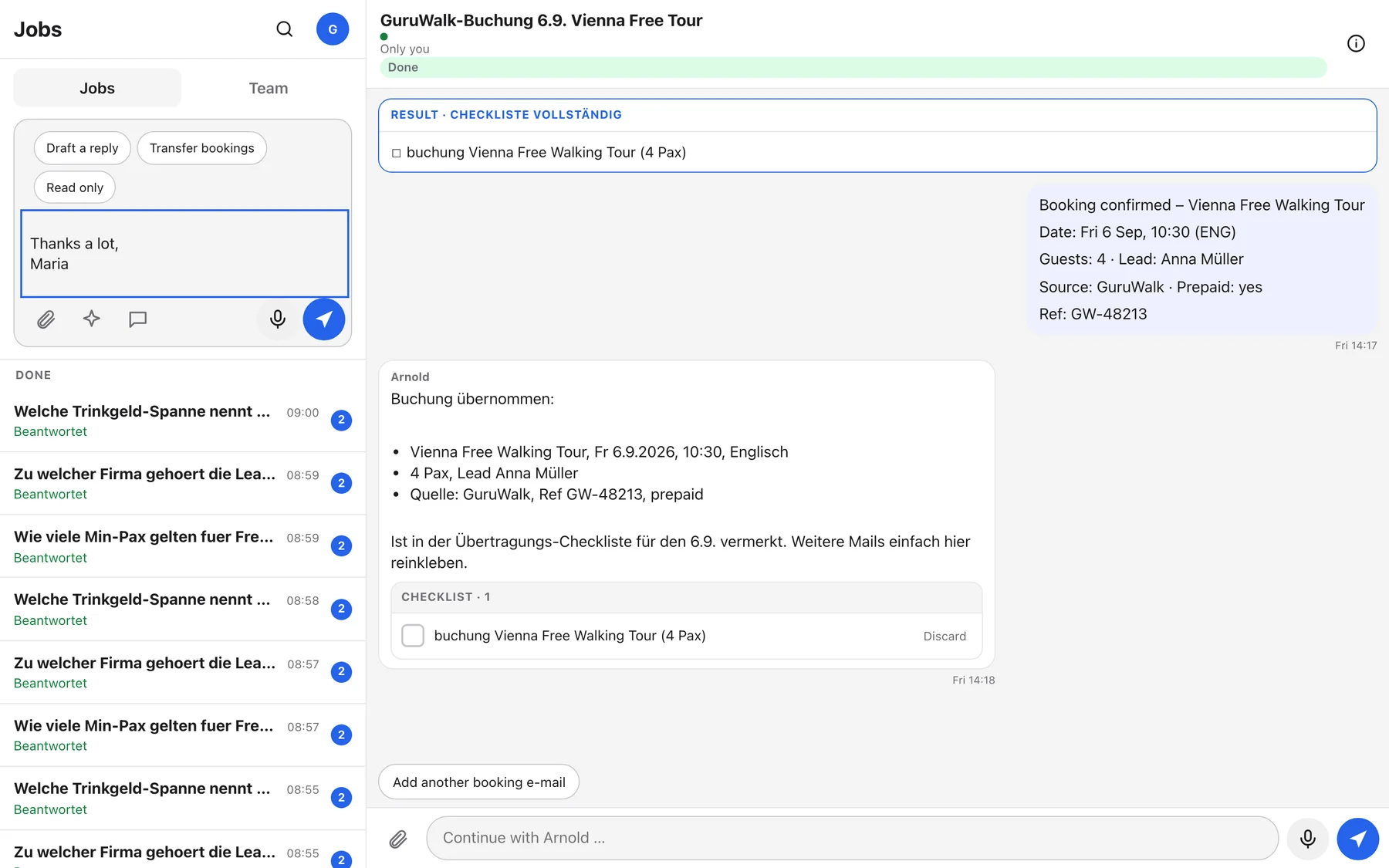
Pasting only shows the intent chips. You still have to press Send.
Where is the old help page or the template buttons?
Gone on purpose. Ask "What can you do?" for the built-in help. Instead of template buttons, write what you need in plain words or use the paste chips.
Glossary
Labels as you see them in English and in German, plus the words the team uses.
| English | German | Meaning |
|---|---|---|
| Jobs | Aufträge | Your list of topics with Arnold. |
| For you · In progress · Open · Done | Für dich · In Arbeit · Offen · Erledigt | The sections of the job list. |
| Arnold is working | Arnold arbeitet | A turn is running. |
| waiting for you | wartet auf dich | Arnold needs your input. |
| awaiting decision | wartet auf Entscheidung | Leadership has to approve or reject. |
| Answered | Beantwortet | The result word of a finished question, in your language. |
| Language: English | Sprache: Deutsch | The interface switch in the avatar menu. |
| FareHarbor not connected | FareHarbor nicht angebunden | Arnold's browser sign-in to FareHarbor is missing. He will not guess. |
| Question or job … | Frage oder Auftrag … | The ask box that starts a new job. |
| Continue with Arnold … | Weiter mit Arnold … | The reply box inside a job. |
| Draft a reply · Transfer bookings · Read only | Antwort entwerfen · Buchungen übertragen · Nur lesen | The chips after pasting an e-mail. |
| Entwurf | Entwurf | Draft. The grey box with a customer text. |
| Copy · Open as e-mail · Copy (trotzdem) | Kopieren · Als E-Mail öffnen · Kopieren (trotzdem) | Draft actions. "Trotzdem" means anyway, the override. |
| Correct | Korrigieren | File a correction to an answer. |
| This is missing from the handbook | Das fehlt im Handbuch | Report a knowledge gap. |
| Thanks, noted | Danke, gemerkt | Arnold's confirmation of a correction. |
| Checklist · Entered · Discard | Checkliste · Eingetragen · Verwerfen | The transfer checklist and its two actions. |
| Who can see this · Only you · Move to Team · Forward | Wer sieht das · Nur du · Ins Team verschieben · Weiterleiten | Visibility and sharing. |
| Approve · Reject | Freigeben · Ablehnen | Leadership decision on an approval card. |
| Creative · Presentation · Landing page · Graphic | Kreativ · Präsentation · Landing Page · Grafik | The creative studio. |
| TravelLocal first message | TravelLocal-Erstnachricht | Sales opener in Clemens' voice. |
| Speak (hold) | Sprechen (halten) | Dictation. |
| Prüfer | Prüfer | The independent checking agent for numbers and facts. |
| Wochenrunde | Wochenrunde | The Sunday 20:00 weekly round that turns corrections into knowledge base proposals. |
| Lücke | Lücke | A knowledge gap. |
| Pax | Pax | Number of guests. |
| Guardrail | Guardrail | The 30 percent minimum margin: purchase price divided by 0.7, times 1.2. |
Quick reference
One page for the desk.
Get in
- arnold.blumi.at, work e-mail, code from the mail
- Phone: Share, Add to Home Screen
- Avatar: notifications, name, sign out
Ask
- Top box = new job, bottom box = same job
- Say what you want back, paste the material, add the facts, set the tone
- Paste an e-mail, pick Draft a reply or Transfer bookings
- Hold the microphone to dictate
He can
- Answer handbook questions with sources
- Draft guest e-mails and review replies
- Put bookings on the transfer checklist
- Calculate quotes, checked by the Prüfer
- TravelLocal first message, Avellera offer PDF
- Presentations, landing pages, graphics
- Read PDFs, photos, spreadsheets
- Look up FareHarbor: availability, manifest, one booking
- List the EasyPlanning tour catalogue
- Answer in German or English, whichever you write
- Ask a colleague, request an approval
He never
- Sends to guests
- Writes into FareHarbor
- Promises fees or deadlines
- Names guides outside
- Goes below the 30 percent guardrail unnoticed
You always
- Read a draft before sending it yourself
- Correct a wrong answer at once
- Tick the checklist after entering in FareHarbor
- Tell Andrew or Robin if he is silent for 10 minutes